Impact Function Calibration#
CLIMADA provides the climada.util.calibrate module for calibrating impact functions based on impact data.
This tutorial will guide through the usage of this module by calibrating an impact function for tropical cyclones (TCs).
For further information on the classes available from the module, see its documentation.
Overview#
The basic idea of the calibration is to find a set of parameters for an impact function that minimizes the deviation between the calculated impact and some impact data. For setting up a calibration task, users have to supply the following information:
Hazard and Exposure (as usual, see the tutorial)
The impact data to calibrate the model to
An impact function definition depending on the calibrated parameters
Bounds and constraints of the calibrated parameters (depending on the calibration algorithm)
A “cost function” defining the single-valued deviation between impact data and calculated impact
A function for transforming the calculated impact into the same data structure as the impact data
This information defines the calibration task and is inserted into the Input object.
Afterwards, the user may insert this object into one of the optimizer classes.
Currently, the following classes are available:
BayesianOptimizer: Uses Bayesian optimization to sample the parameter space.ScipyMinimizeOptimizer: Uses thescipy.optimize.minimizefunction for determining the best parameter set.
The following tutorial walks through the input data preparation and the setup of a BayesianOptimizer instance for calibration.
For a brief example, refer to Quickstart.
If you want to go through a somewhat realistic calibration task step-by-step, continue with Calibration Data.
import logging
import climada

logging.getLogger("climada").setLevel("WARNING")
Quickstart#
This section gives a very quick overview of assembling a calibration task.
Here, we calibrate a single impact function for damage reports in Mexico (MEX) from a TC with IbtracsID 2010176N16278.
import pandas as pd

from climada.util import log_level
from climada.util.api_client import Client
from climada.entity import ImpactFuncSet, ImpfTropCyclone
from climada.util.calibrate import (
    Input,
    BayesianOptimizer,
    BayesianOptimizerController,
    OutputEvaluator,
    msle,
)

# Load hazard and exposure from Data API
client = Client()
exposure = client.get_litpop("MEX")
exposure.gdf["impf_TC"] = 1
all_tcs = client.get_hazard(
    "tropical_cyclone",
    properties={"event_type": "observed", "spatial_coverage": "global"},
)
hazard = all_tcs.select(event_names=["2010176N16278"])

# Impact data (columns: region ID, index: hazard event ID)
data = pd.DataFrame(data=[[2.485465e09]], columns=[484], index=list(hazard.event_id))

# Create input
inp = Input(
    hazard=hazard,
    exposure=exposure,
    data=data,
    # Generate impact function from estimated parameters
    impact_func_creator=lambda v_half: ImpactFuncSet(
        [ImpfTropCyclone.from_emanuel_usa(v_half=v_half, impf_id=1)]
    ),
    # Estimated parameter bounds
    bounds={"v_half": (26, 100)},
    # Cost function
    cost_func=msle,
    # Transform impact to pandas Dataframe with same structure as data
    impact_to_dataframe=lambda impact: impact.impact_at_reg(exposure.gdf["region_id"]),
)

# Set up optimizer (with controller)
controller = BayesianOptimizerController.from_input(inp)
opt = BayesianOptimizer(inp)

# Run optimization
with log_level("WARNING", "climada.engine.impact_calc"):
    output = opt.run(controller=controller)

# Analyse results
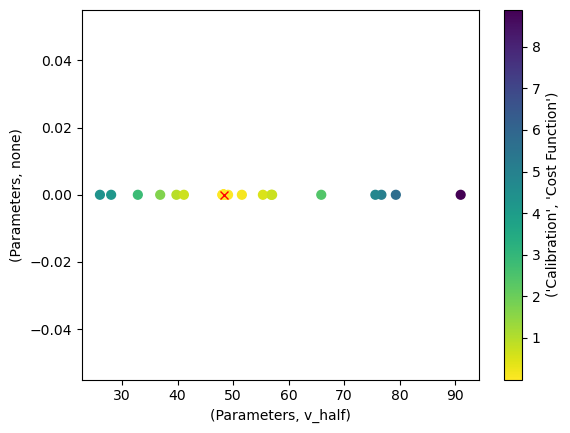
output.plot_p_space()
out_eval = OutputEvaluator(inp, output)
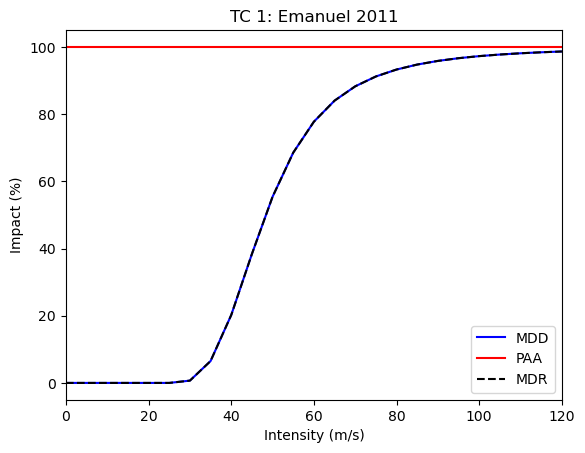
out_eval.impf_set.plot()

# Optimal value
output.params
{'v_half': 48.30330871103452}
Follow the next sections of the tutorial for a more in-depth explanation.
Calibration Data#
CLIMADA ships data from the International Disaster Database EM-DAT, which we will use to calibrate impact functions on.
In the first step, we will select TC events that caused damages in the NA1 basin since 2010.
We use EMDAT data from TCs occurring in the NA1 basin since 2010.
We calculate the centroids for which we want to compute the windfields by extracting the countries hit by the cyclones and retrieving a LitPop exposure instance from them.
We then use the exposure coordinates as centroids coordinates.
import pandas as pd
from climada.util.constants import SYSTEM_DIR

emdat = pd.read_csv(SYSTEM_DIR / "tc_impf_cal_v01_EDR.csv")
emdat_subset = emdat[(emdat["cal_region2"] == "NA1") & (emdat["year"] >= 2010)]
emdat_subset
| country | region_id | cal_region2 | year | EM_ID | ibtracsID | emdat_impact | reference_year | emdat_impact_scaled | climada_impact | ... | scale | log_ratio | unique_ID | Associated_disaster | Surge | Rain | Flood | Slide | Other | OtherThanSurge | |
|---|---|---|---|---|---|---|---|---|---|---|---|---|---|---|---|---|---|---|---|---|---|
| 326 | MEX | 484 | NA1 | 2010 | 2010-0260 | 2010176N16278 | 2.000000e+09 | 2014 | 2.485465e+09 | 2.478270e+09 | ... | 1.0 | -0.002899 | 2010-0260MEX | True | False | False | True | False | False | True |
| 331 | ATG | 28 | NA1 | 2010 | 2010-0468 | 2010236N12341 | 1.260000e+07 | 2014 | 1.394594e+07 | 1.402875e+07 | ... | 1.0 | 0.005920 | 2010-0468ATG | True | False | False | True | False | False | True |
| 334 | MEX | 484 | NA1 | 2010 | 2010-0494 | 2010257N16282 | 3.900000e+09 | 2014 | 4.846656e+09 | 4.857140e+09 | ... | 1.0 | 0.002161 | 2010-0494MEX | True | False | False | True | False | False | True |
| 339 | LCA | 662 | NA1 | 2010 | 2010-0571 | 2010302N09306 | 5.000000e+05 | 2014 | 5.486675e+05 | 5.492871e+05 | ... | 1.0 | 0.001129 | 2010-0571LCA | True | False | False | True | True | False | True |
| 340 | VCT | 670 | NA1 | 2010 | 2010-0571 | 2010302N09306 | 2.500000e+07 | 2014 | 2.670606e+07 | 2.676927e+07 | ... | 1.0 | 0.002364 | 2010-0571VCT | False | False | False | False | False | False | False |
| 344 | BHS | 44 | NA1 | 2011 | 2011-0328 | 2011233N15301 | 4.000000e+07 | 2014 | 4.352258e+07 | 4.339898e+07 | ... | 1.0 | -0.002844 | 2011-0328BHS | False | False | False | False | False | False | False |
| 345 | DOM | 214 | NA1 | 2011 | 2011-0328 | 2011233N15301 | 3.000000e+07 | 2014 | 3.428317e+07 | 3.404744e+07 | ... | 1.0 | -0.006900 | 2011-0328DOM | True | False | False | True | False | False | True |
| 346 | PRI | 630 | NA1 | 2011 | 2011-0328 | 2011233N15301 | 5.000000e+08 | 2014 | 5.104338e+08 | 5.139659e+08 | ... | 1.0 | 0.006896 | 2011-0328PRI | True | False | False | True | False | False | True |
| 352 | MEX | 484 | NA1 | 2011 | 2011-0385 | 2011279N10257 | 2.770000e+07 | 2014 | 3.084603e+07 | 3.077374e+07 | ... | 1.0 | -0.002346 | 2011-0385MEX | True | False | False | True | True | False | True |
| 359 | MEX | 484 | NA1 | 2012 | 2012-0276 | 2012215N12313 | 3.000000e+08 | 2014 | 3.283428e+08 | 3.284805e+08 | ... | 1.0 | 0.000419 | 2012-0276MEX | False | False | False | False | False | False | False |
| 365 | MEX | 484 | NA1 | 2012 | 2012-0401 | 2012166N09269 | 5.550000e+08 | 2014 | 6.074341e+08 | 6.103254e+08 | ... | 1.0 | 0.004749 | 2012-0401MEX | False | False | False | False | False | False | False |
| 369 | JAM | 388 | NA1 | 2012 | 2012-0410 | 2012296N14283 | 1.654200e+07 | 2014 | 1.548398e+07 | 1.548091e+07 | ... | 1.0 | -0.000198 | 2012-0410JAM | False | False | False | False | False | False | False |
| 406 | MEX | 484 | NA1 | 2014 | 2014-0333 | 2014253N13260 | 2.500000e+09 | 2014 | 2.500000e+09 | 2.501602e+09 | ... | 1.0 | 0.000640 | 2014-0333MEX | True | False | False | True | False | False | True |
| 427 | MEX | 484 | NA1 | 2015 | 2015-0470 | 2015293N13266 | 8.230000e+08 | 2014 | 9.242430e+08 | 9.239007e+08 | ... | 1.0 | -0.000370 | 2015-0470MEX | True | False | False | True | False | False | True |
| 428 | CPV | 132 | NA1 | 2015 | 2015-0473 | 2015242N12343 | 1.100000e+06 | 2014 | 1.281242e+06 | 1.282842e+06 | ... | 1.0 | 0.001248 | 2015-0473CPV | False | False | False | False | False | False | False |
| 429 | BHS | 44 | NA1 | 2015 | 2015-0479 | 2015270N27291 | 9.000000e+07 | 2014 | 8.362720e+07 | 1.129343e+06 | ... | 1.0 | -4.304733 | 2015-0479BHS | True | True | False | True | False | False | True |
| 437 | MEX | 484 | NA1 | 2016 | 2016-0319 | 2016248N15255 | 5.000000e+07 | 2014 | 6.098482e+07 | 6.088808e+07 | ... | 1.0 | -0.001588 | 2016-0319MEX | True | False | False | True | False | False | True |
| 451 | MEX | 484 | NA1 | 2017 | 2017-0334 | 2017219N16279 | 2.000000e+06 | 2014 | 2.284435e+06 | 2.285643e+06 | ... | 1.0 | 0.000529 | 2017-0334MEX | True | False | False | True | True | False | True |
| 456 | ATG | 28 | NA1 | 2017 | 2017-0381 | 2017242N16333 | 2.500000e+08 | 2014 | 2.111764e+08 | 2.110753e+08 | ... | 1.0 | -0.000479 | 2017-0381ATG | False | False | False | False | False | False | False |
| 457 | BHS | 44 | NA1 | 2017 | 2017-0381 | 2017242N16333 | 2.000000e+06 | 2014 | 1.801876e+06 | 6.118379e+05 | ... | 1.0 | -1.080116 | 2017-0381BHS | False | False | False | False | False | False | False |
| 458 | CUB | 192 | NA1 | 2017 | 2017-0381 | 2017242N16333 | 1.320000e+10 | 2014 | 1.099275e+10 | 1.090424e+10 | ... | 1.0 | -0.008085 | 2017-0381CUB | True | False | False | True | False | False | True |
| 459 | KNA | 659 | NA1 | 2017 | 2017-0381 | 2017242N16333 | 2.000000e+07 | 2014 | 1.848489e+07 | 1.848665e+07 | ... | 1.0 | 0.000095 | 2017-0381KNA | False | False | False | False | False | False | False |
| 460 | TCA | 796 | NA1 | 2017 | 2017-0381 | 2017242N16333 | 5.000000e+08 | 2014 | 5.000000e+08 | 5.003790e+08 | ... | 1.0 | 0.000758 | 2017-0381TCA | True | False | False | True | False | False | True |
| 462 | VGB | 92 | NA1 | 2017 | 2017-0381 | 2017242N16333 | 3.000000e+09 | 2014 | 3.000000e+09 | 6.236200e+08 | ... | 1.0 | -1.570826 | 2017-0381VGB | False | False | False | False | False | False | False |
| 463 | DMA | 212 | NA1 | 2017 | 2017-0383 | 2017260N12310 | 1.456000e+09 | 2014 | 1.534596e+09 | 8.951186e+08 | ... | 1.0 | -0.539066 | 2017-0383DMA | True | False | False | True | True | False | True |
| 464 | DOM | 214 | NA1 | 2017 | 2017-0383 | 2017260N12310 | 6.300000e+07 | 2014 | 5.481371e+07 | 5.493466e+07 | ... | 1.0 | 0.002204 | 2017-0383DOM | True | False | False | True | True | False | True |
| 465 | PRI | 630 | NA1 | 2017 | 2017-0383 | 2017260N12310 | 6.800000e+10 | 2014 | 6.700905e+10 | 6.702718e+10 | ... | 1.0 | 0.000271 | 2017-0383PRI | True | False | False | True | False | True | True |
27 rows × 22 columns
Each entry in the database refers to an economic impact for a specific country and TC event. The TC events are identified by the ID assigned from the International Best Track Archive for Climate Stewardship (IBTrACS). We now want to reshape this data so that impacts are grouped by event and country.
To achieve this, we iterate over the unique track IDs, select all reported damages associated with this ID, and concatenate the results.
For missing entries, pandas will set the value to NaN.
We assume that missing entries means that no damages are reported (this is a strong assumption), and set all NaN values to zero.
Then, we transpose the dataframe so that each row represents an event and each column states the damage for a specific country.
Finally, we set the track ID to be the index of the data frame.
track_ids = emdat_subset["ibtracsID"].unique()

data = pd.pivot_table(
    emdat_subset,
    values="emdat_impact_scaled",
    index="ibtracsID",
    columns="region_id",
    # fill_value=0,
)
data
| region_id | 28 | 44 | 92 | 132 | 192 | 212 | 214 | 388 | 484 | 630 | 659 | 662 | 670 | 796 |
|---|---|---|---|---|---|---|---|---|---|---|---|---|---|---|
| ibtracsID | ||||||||||||||
| 2010176N16278 | NaN | NaN | NaN | NaN | NaN | NaN | NaN | NaN | 2.485465e+09 | NaN | NaN | NaN | NaN | NaN |
| 2010236N12341 | 1.394594e+07 | NaN | NaN | NaN | NaN | NaN | NaN | NaN | NaN | NaN | NaN | NaN | NaN | NaN |
| 2010257N16282 | NaN | NaN | NaN | NaN | NaN | NaN | NaN | NaN | 4.846656e+09 | NaN | NaN | NaN | NaN | NaN |
| 2010302N09306 | NaN | NaN | NaN | NaN | NaN | NaN | NaN | NaN | NaN | NaN | NaN | 548667.5019 | 26706058.15 | NaN |
| 2011233N15301 | NaN | 4.352258e+07 | NaN | NaN | NaN | NaN | 34283168.75 | NaN | NaN | 5.104338e+08 | NaN | NaN | NaN | NaN |
| 2011279N10257 | NaN | NaN | NaN | NaN | NaN | NaN | NaN | NaN | 3.084603e+07 | NaN | NaN | NaN | NaN | NaN |
| 2012166N09269 | NaN | NaN | NaN | NaN | NaN | NaN | NaN | NaN | 6.074341e+08 | NaN | NaN | NaN | NaN | NaN |
| 2012215N12313 | NaN | NaN | NaN | NaN | NaN | NaN | NaN | NaN | 3.283428e+08 | NaN | NaN | NaN | NaN | NaN |
| 2012296N14283 | NaN | NaN | NaN | NaN | NaN | NaN | NaN | 15483975.86 | NaN | NaN | NaN | NaN | NaN | NaN |
| 2014253N13260 | NaN | NaN | NaN | NaN | NaN | NaN | NaN | NaN | 2.500000e+09 | NaN | NaN | NaN | NaN | NaN |
| 2015242N12343 | NaN | NaN | NaN | 1281242.483 | NaN | NaN | NaN | NaN | NaN | NaN | NaN | NaN | NaN | NaN |
| 2015270N27291 | NaN | 8.362720e+07 | NaN | NaN | NaN | NaN | NaN | NaN | NaN | NaN | NaN | NaN | NaN | NaN |
| 2015293N13266 | NaN | NaN | NaN | NaN | NaN | NaN | NaN | NaN | 9.242430e+08 | NaN | NaN | NaN | NaN | NaN |
| 2016248N15255 | NaN | NaN | NaN | NaN | NaN | NaN | NaN | NaN | 6.098482e+07 | NaN | NaN | NaN | NaN | NaN |
| 2017219N16279 | NaN | NaN | NaN | NaN | NaN | NaN | NaN | NaN | 2.284435e+06 | NaN | NaN | NaN | NaN | NaN |
| 2017242N16333 | 2.111764e+08 | 1.801876e+06 | 3.000000e+09 | NaN | 1.099275e+10 | NaN | NaN | NaN | NaN | NaN | 18484889.46 | NaN | NaN | 500000000.0 |
| 2017260N12310 | NaN | NaN | NaN | NaN | NaN | 1.534596e+09 | 54813712.03 | NaN | NaN | 6.700905e+10 | NaN | NaN | NaN | NaN |
This is the data against which we want to compare our model output. Let’s continue setting up the calibration!
Model Setup#
In the first step, we create the exposure layer for the model.
We use the LitPop module and simply pass the names of all countries listed in our calibration data to the from_countries() classmethod.
The countries are the columns in the data object.
Alternatively, we could have inserted emdat_subset["region_id"].unique().tolist().
# from climada.entity.exposures.litpop import LitPop
# from climada.util import log_level

# # Calculate the exposure
# with log_level("ERROR"):
#     exposure = LitPop.from_countries(data.columns.tolist())
from climada.util.api_client import Client
from climada.entity.exposures.litpop import LitPop
from climada.util.coordinates import country_to_iso

client = Client()
exposure = LitPop.concat(
    [
        client.get_litpop(country_to_iso(country_id, representation="alpha3"))
        for country_id in data.columns
    ]
)
from climada.util.api_client import Client

client = Client()
tc_dataset_infos = client.list_dataset_infos(data_type="tropical_cyclone")
client.get_property_values(
    client.list_dataset_infos(data_type="tropical_cyclone"),
    known_property_values={"event_type": "observed", "spatial_coverage": "global"},
)
{'res_arcsec': ['150'],
 'event_type': ['observed'],
 'spatial_coverage': ['global'],
 'climate_scenario': ['None']}
We will use the CLIMADA Data API to download readily computed wind fields from TC tracks.
The API provides a large dataset containing all historical TC tracks.
We will download them and then select the subset of TCs for which we have impact data by using select().
from climada.util.api_client import Client

client = Client()
all_tcs = client.get_hazard(
    "tropical_cyclone",
    properties={"event_type": "observed", "spatial_coverage": "global"},
)
hazard = all_tcs.select(event_names=track_ids.tolist())
NOTE: Discouraged! This will usually take a longer time than using the Data API
Alternatively, CLIMADA provides the TCTracks class, which lets us download the tracks of TCs using their IBTrACS IDs.
We then have to equalize the time steps of the different TC tracks.
The track and intensity of a cyclone are insufficient to compute impacts in CLIMADA. We first have to re-compute a windfield from each track at the locations of interest. For consistency, we simply choose the coordinates of the exposure.
# NOTE: Uncomment this to compute wind fields yourself

# from climada.hazard import Centroids, TCTracks, TropCyclone

# # Get the tracks for associated TCs
# tracks = TCTracks.from_ibtracs_netcdf(storm_id=track_ids.tolist())
# tracks.equal_timestep(time_step_h=1.0, land_params=False)
# tracks.plot()

# # Calculate windfield for the tracks
# centroids = Centroids.from_lat_lon(exposure.gdf['latitude'], exposure.gdf['longitude'])
# hazard = TropCyclone.from_tracks(tracks, centroids)
Calibration Setup#
We are now set up to define the specifics of the calibration task.
First, let us define the impact function we actually want to calibrate.
We select the formula by Emanuel (2011), for which a shortcut exists in the CLIMADA code base: from_emanuel_usa().
The sigmoid-like impact function takes three parameters, the wind threshold for any impact v_thresh, the wind speed where half of the impact occurs v_half, and the maximum impact factor scale.
According to the model by Emanuel (2011), v_thresh is considered a constant, so we choose to only calibrate the latter two.
Any CLIMADA Optimizer will roughly perform the following algorithm:
Create a set of parameters and built an impact function (set) from it.
Compute an impact with that impact function set.
Compare the impact and the calibration data via the cost/target function.
Repeat N times or until the target function goal is reached.
The selection of parameters is based on the target function varies strongly between different optimization algorithms.
For the first step, we have to supply a function that takes the parameters we try to estimate and returns the impact function set that can later be used in an impact calculation. We only calibrate a single function for the entire basin, so this is straightforward.
To ensure the impact function is applied correctly, we also have to set the impf_ column of the exposure GeoDataFrame.
Note that the default impact function ID is 1, and that the hazard type is "TC".
from climada.entity import ImpactFuncSet, ImpfTropCyclone

# Match impact function and exposure
exposure.gdf["impf_TC"] = 1


def impact_func_tc(v_half, scale):
    return ImpactFuncSet([ImpfTropCyclone.from_emanuel_usa(v_half=v_half, scale=scale)])
We will be using the BayesianOptimizer, which requires very little information on the parameter space beforehand.
One crucial information are the bounds of the parameters, though.
Initial values are not needed because the optimizer first samples the bound parameter space uniformly and then iteratively “narrows down” the search.
We choose a v_half between v_thresh and 150, and a scale between 0.01 (it must never be zero) and 1.0.
Specifying the bounds as dictionary (a must in case of BayesianOptimizer) also serves the purpose of naming the parameters we want to calibrate.
Notice that these names have to match the arguments of the impact function generator.
bounds = {"v_half": (25.8, 150), "scale": (0.01, 1)}
Defining the cost function is crucial for the result of the calibration.
You can choose what is best suited for your application.
Often, it is not clear which function works best, and it’s a good idea to try out a few.
Because the impacts of different events may vary over several orders of magnitude, we select the mean squared logartihmic error (MSLE).
This one and other error measures are readily supplied by the sklearn package.
The cost function must be defined as a function that takes the impact object calculated by the optimization algorithm and the input calibration data as arguments, and that returns a single number. This number represents a “cost” of the parameter set used for calculating the impact. A higher cost therefore is worse, a lower cost is better. Any optimizer will try to minimize the cost.
Note that the impact object is an instance of Impact, whereas the input calibration data is a pd.DataFrame.
To compute the MSLE, we first have to transform the impact into the same data structure, meaning that we have to aggregate the point-wise impacts by event and country.
The function performing this transformation task is provided to the Input via its impact_to_dataframe attribute.
Here we choose climada.engine.impact.Impact.impact_at_reg(), which aggregates over countries by default.
To improve performance, we can supply this function with our known region IDs instead of re-computing them in every step.
Computations on data frames align columns and indexes.
The indexes of the calibration data are the IBTrACS IDs, but the indexes of the result of impact_at_reg are the hazard event IDs, which at this point are only integer numbers.
To resolve that, we adjust our calibration dataframe to carry the respective Hazard.event_id as index.
data = data.rename(
    index={
        hazard.event_name[idx]: hazard.event_id[idx]
        for idx in range(len(hazard.event_id))
    }
)
data.index.rename("event_id", inplace=True)
data
| region_id | 28 | 44 | 92 | 132 | 192 | 212 | 214 | 388 | 484 | 630 | 659 | 662 | 670 | 796 |
|---|---|---|---|---|---|---|---|---|---|---|---|---|---|---|
| event_id | ||||||||||||||
| 1333 | NaN | NaN | NaN | NaN | NaN | NaN | NaN | NaN | 2.485465e+09 | NaN | NaN | NaN | NaN | NaN |
| 1339 | 1.394594e+07 | NaN | NaN | NaN | NaN | NaN | NaN | NaN | NaN | NaN | NaN | NaN | NaN | NaN |
| 1344 | NaN | NaN | NaN | NaN | NaN | NaN | NaN | NaN | 4.846656e+09 | NaN | NaN | NaN | NaN | NaN |
| 1351 | NaN | NaN | NaN | NaN | NaN | NaN | NaN | NaN | NaN | NaN | NaN | 548667.5019 | 26706058.15 | NaN |
| 1361 | NaN | 4.352258e+07 | NaN | NaN | NaN | NaN | 34283168.75 | NaN | NaN | 5.104338e+08 | NaN | NaN | NaN | NaN |
| 3686 | NaN | NaN | NaN | NaN | NaN | NaN | NaN | NaN | 3.084603e+07 | NaN | NaN | NaN | NaN | NaN |
| 3691 | NaN | NaN | NaN | NaN | NaN | NaN | NaN | NaN | 6.074341e+08 | NaN | NaN | NaN | NaN | NaN |
| 1377 | NaN | NaN | NaN | NaN | NaN | NaN | NaN | NaN | 3.283428e+08 | NaN | NaN | NaN | NaN | NaN |
| 1390 | NaN | NaN | NaN | NaN | NaN | NaN | NaN | 15483975.86 | NaN | NaN | NaN | NaN | NaN | NaN |
| 3743 | NaN | NaN | NaN | NaN | NaN | NaN | NaN | NaN | 2.500000e+09 | NaN | NaN | NaN | NaN | NaN |
| 1421 | NaN | NaN | NaN | 1281242.483 | NaN | NaN | NaN | NaN | NaN | NaN | NaN | NaN | NaN | NaN |
| 1426 | NaN | 8.362720e+07 | NaN | NaN | NaN | NaN | NaN | NaN | NaN | NaN | NaN | NaN | NaN | NaN |
| 3777 | NaN | NaN | NaN | NaN | NaN | NaN | NaN | NaN | 9.242430e+08 | NaN | NaN | NaN | NaN | NaN |
| 3795 | NaN | NaN | NaN | NaN | NaN | NaN | NaN | NaN | 6.098482e+07 | NaN | NaN | NaN | NaN | NaN |
| 1450 | NaN | NaN | NaN | NaN | NaN | NaN | NaN | NaN | 2.284435e+06 | NaN | NaN | NaN | NaN | NaN |
| 1454 | 2.111764e+08 | 1.801876e+06 | 3.000000e+09 | NaN | 1.099275e+10 | NaN | NaN | NaN | NaN | NaN | 18484889.46 | NaN | NaN | 500000000.0 |
| 1458 | NaN | NaN | NaN | NaN | NaN | 1.534596e+09 | 54813712.03 | NaN | NaN | 6.700905e+10 | NaN | NaN | NaN | NaN |
Execute the Calibration#
We created a class BayesianOptimizerController to control and guide the calibration process.
It is intended to walk through several optimization iterations and stop the process if the best guess cannot be improved.
The optimization works as follows:
The optimizer randomly samples the parameter space
init_pointstimes.The optimizer uses a Gaussian regression process to “smartly” sample the parameter space at most
n_itertimes.The process uses an “Upper Confidence Bound” sampling method whose parameter
kappaindicates how close the sampled points are to the buest guess. Higherkappameans more exploration of the parameter space, lowerkappameans more exploitation.After each sample, the parameter
kappais reduced by the factorkappa_decay. By default, this parameter is set such thatkappaequalskappa_minat the last step. This way, the sampling becomes more exploitative the more steps are taken.
The controller tracks the improvements of the buest guess for parameters. If
min_improvement_countconsecutive improvements are lower thanmin_improvement, the smart sampling is stopped. In this case, theiterationscount is increased and the process repeated from step 1.If an entire iteration did not show any improvement, the optimization is stopped. It is also stopped when the
max_iterationscount is reached.
Users can control the “density”, and thus the accuracy of the sampling by adjusting the controller parameters.
Increasing init_points, n_iter, min_improvement_count, and max_iterations, and decreasing min_improvement generally increases density and accuracy, but leads to longer runtimes.
We suggest using the from_input classmethod for a convenient choice of sampling density based on the parameter space.
The two parameters init_points and n_iter are set to \(b^N\), where \(N\) is the number of estimated parameters and \(b\) is the sampling_base parameter, which defaults to 4.
Now we can finally execute our calibration task!
We will plug all input parameters in an instance of Input, and then create the optimizer instance with it.
The Optimizer.run method returns an Output object, whose params attribute holds the optimal parameters determined by the calibration.
Notice that the BayesianOptimization maximizes a target function.
Therefore, higher target values are better than lower ones in this case.
from climada.util.calibrate import (
    Input,
    BayesianOptimizer,
    BayesianOptimizerController,
    msle,
)

from climada.util import log_level

# Define calibration input
with log_level("INFO", name_prefix="climada.util.calibrate"):
    input = Input(
        hazard=hazard,
        exposure=exposure,
        data=data,
        impact_func_creator=impact_func_tc,
        cost_func=msle,
        impact_to_dataframe=lambda imp: imp.impact_at_reg(exposure.gdf["region_id"]),
        bounds=bounds,
    )

    # Create and run the optimizer
    opt = BayesianOptimizer(input)
    controller = BayesianOptimizerController.from_input(input)
    bayes_output = opt.run(controller=controller)
    bayes_output.params  # The optimal parameters
2025-06-23 13:06:39,791 - climada.util.calibrate.bayesian_optimizer - INFO - Optimization iteration: 0
2025-06-23 13:06:42,001 - climada.util.calibrate.bayesian_optimizer - INFO - Optimization iteration: 1
2025-06-23 13:06:44,417 - climada.util.calibrate.bayesian_optimizer - INFO - Optimization iteration: 2
2025-06-23 13:06:46,862 - climada.util.calibrate.bayesian_optimizer - INFO - Optimization iteration: 3
2025-06-23 13:06:49,665 - climada.util.calibrate.bayesian_optimizer - INFO - Optimization iteration: 4
2025-06-23 13:06:52,649 - climada.util.calibrate.bayesian_optimizer - INFO - Optimization iteration: 5
2025-06-23 13:06:55,998 - climada.util.calibrate.bayesian_optimizer - INFO - Optimization iteration: 6
2025-06-23 13:06:59,703 - climada.util.calibrate.bayesian_optimizer - INFO - No improvement. Stop optimization.
Evaluate Output#
The Bayesian Optimizer returns the entire paramter space it sampled via BayesianOptimizerOutput
We can find out a lot about the relation of the fitted parameters by investigating how the cost function value depends on them.
We can retrieve the parameter space as pandas.DataFrame via p_space_to_dataframe().
This dataframe has MultiIndex columns.
One group are the Parameters, the other holds information on the Calibration for each parameter set.
Notice that the optimal parameter set is not necessarily the last entry in the parameter space!
p_space_df = bayes_output.p_space_to_dataframe()
p_space_df
| Parameters | Calibration | ||
|---|---|---|---|
| scale | v_half | Cost Function | |
| Iteration | |||
| 0 | 0.422852 | 115.264302 | 2.726950 |
| 1 | 0.010113 | 63.349706 | 4.133135 |
| 2 | 0.155288 | 37.268453 | 0.800611 |
| 3 | 0.194398 | 68.718642 | 1.683610 |
| 4 | 0.402800 | 92.721038 | 2.046407 |
| ... | ... | ... | ... |
| 219 | 0.711724 | 51.676718 | 0.773888 |
| 220 | 0.920147 | 48.767230 | 0.771611 |
| 221 | 0.903951 | 50.001947 | 0.765957 |
| 222 | 1.000000 | 52.968157 | 0.764202 |
| 223 | 0.799533 | 49.721016 | 0.765107 |
224 rows × 3 columns
In contrast, the controller only tracks the consecutive improvements of the best guess.
controller.improvements()
| iteration | random | target | improvement | |
|---|---|---|---|---|
| sample | ||||
| 0 | 0 | True | -2.726950 | inf |
| 2 | 0 | True | -0.800611 | 2.406088 |
| 24 | 0 | False | -0.793780 | 0.008605 |
| 29 | 0 | False | -0.791065 | 0.003432 |
| 40 | 1 | False | -0.781115 | 0.012737 |
| 44 | 1 | False | -0.777910 | 0.004119 |
| 48 | 1 | False | -0.774136 | 0.004876 |
| 60 | 1 | False | -0.773844 | 0.000377 |
| 81 | 2 | False | -0.770928 | 0.003782 |
| 87 | 2 | False | -0.770386 | 0.000704 |
| 89 | 2 | False | -0.768256 | 0.002773 |
| 117 | 3 | False | -0.765309 | 0.003850 |
| 123 | 3 | False | -0.765110 | 0.000260 |
| 156 | 4 | False | -0.764939 | 0.000223 |
| 178 | 5 | False | -0.763951 | 0.001294 |
| 189 | 5 | False | -0.763910 | 0.000054 |
To get one group of the columns, simply access the item.
p_space_df["Parameters"]
| scale | v_half | |
|---|---|---|
| Iteration | ||
| 0 | 0.422852 | 115.264302 |
| 1 | 0.010113 | 63.349706 |
| 2 | 0.155288 | 37.268453 |
| 3 | 0.194398 | 68.718642 |
| 4 | 0.402800 | 92.721038 |
| ... | ... | ... |
| 219 | 0.711724 | 51.676718 |
| 220 | 0.920147 | 48.767230 |
| 221 | 0.903951 | 50.001947 |
| 222 | 1.000000 | 52.968157 |
| 223 | 0.799533 | 49.721016 |
224 rows × 2 columns
Notice that the optimal parameter set is not necessarily the last entry in the parameter space! Therefore, let’s order the parameter space by the ascending cost function values.
p_space_df = p_space_df.sort_values(("Calibration", "Cost Function"), ascending=True)
p_space_df
| Parameters | Calibration | ||
|---|---|---|---|
| scale | v_half | Cost Function | |
| Iteration | |||
| 189 | 1.000000 | 52.392753 | 0.763910 |
| 178 | 1.000000 | 52.176364 | 0.763951 |
| 185 | 1.000000 | 52.647234 | 0.763968 |
| 222 | 1.000000 | 52.968157 | 0.764202 |
| 180 | 1.000000 | 51.656629 | 0.764398 |
| ... | ... | ... | ... |
| 139 | 0.081255 | 145.935720 | 5.822272 |
| 35 | 0.028105 | 118.967924 | 6.298332 |
| 97 | 0.012842 | 102.449398 | 6.635728 |
| 204 | 0.031310 | 143.537900 | 7.262185 |
| 101 | 0.025663 | 141.236104 | 7.504095 |
224 rows × 3 columns
The BayesianOptimizerOutput supplies the plot_p_space() method for convenience.
If there were more than two parameters we calibrated, it would produce a plot for each parameter combination.
bayes_output.plot_p_space(x="v_half", y="scale")
<Axes: xlabel='(Parameters, v_half)', ylabel='(Parameters, scale)'>
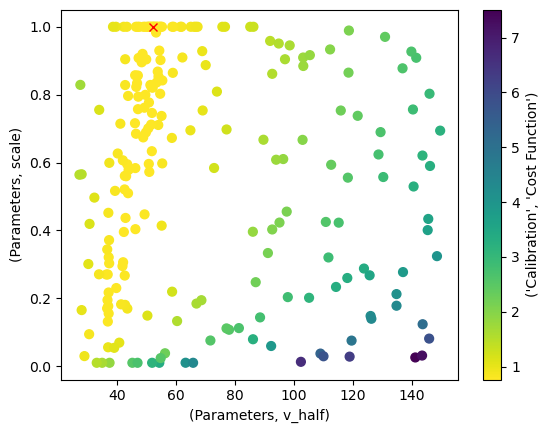
p_space_df["Parameters"].iloc[0, :].to_dict()
{'scale': 1.0, 'v_half': 52.392753384866985}
Analyze the Calibration#
Now that we obtained a calibration result, we should investigate it further.
The tasks of evaluating results and plotting them is simplified by the OutputEvaluator.
It takes the input and output of a calibration task as parameters.
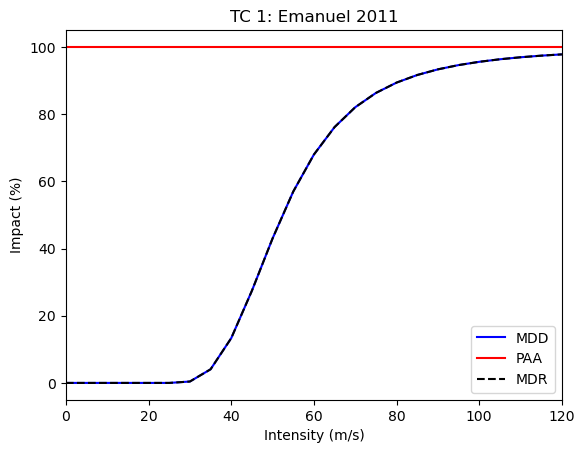
Let’s start by plotting the optimized impact function:
from climada.util.calibrate import OutputEvaluator

output_eval = OutputEvaluator(input, bayes_output)
output_eval.impf_set.plot()
<Axes: title={'center': 'TC 1: Emanuel 2011'}, xlabel='Intensity (m/s)', ylabel='Impact (%)'>
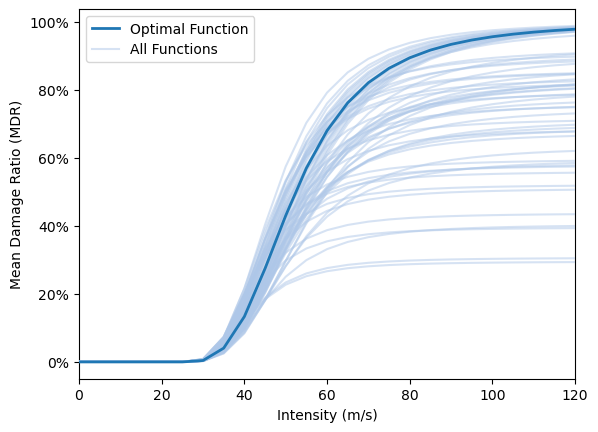
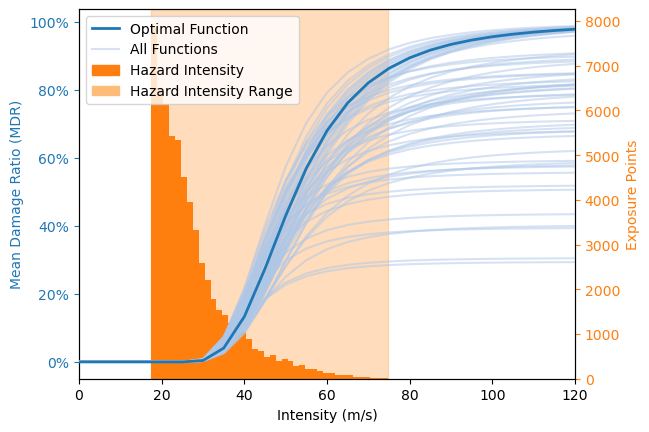
Here we show how the variability in parameter combinations with similar cost function values (as seen in the plot of the parameter space) translate to varying impact functions. In addition, the hazard value distribution is shown. Together this provides an intuitive overview regarding the robustness of the optimization, given the chosen cost function. It does NOT provide a view of the sampling uncertainty (as e.g. bootstrapping or cross-validation) NOR of the suitability of the cost function which is chosen by the user.
This functionality is only available from the BayesianOptimizerOutputEvaluator tailored to Bayesian optimizer outputs.
It includes all function from OutputEvaluator.
from climada.util.calibrate import BayesianOptimizerOutputEvaluator, select_best

output_eval = BayesianOptimizerOutputEvaluator(input, bayes_output)

# Plot the impact function variability
output_eval.plot_impf_variability(select_best(p_space_df, 0.03), plot_haz=False)
output_eval.plot_impf_variability(select_best(p_space_df, 0.03))
<Axes: xlabel='Intensity (m/s)', ylabel='Mean Damage Ratio (MDR)'>
The target function has limited meaning outside the calibration task.
To investigate the quality of the calibration, it is helpful to compute the impact with the impact function defined by the optimal parameters.
The OutputEvaluator readily computed this impact when it was created.
You can access the impact via the impact attribute.
import numpy as np

impact_data = output_eval.impact.impact_at_reg(exposure.gdf["region_id"])
impact_data.set_index(np.asarray(hazard.event_name), inplace=True)
impact_data
| 28 | 44 | 92 | 132 | 192 | 212 | 214 | 388 | 484 | 630 | 659 | 662 | 670 | 796 | |
|---|---|---|---|---|---|---|---|---|---|---|---|---|---|---|
| 2010176N16278 | 0.000000e+00 | 0.000000e+00 | 0.000000e+00 | 0.000000 | 0.000000e+00 | 0.000000e+00 | 0.000000e+00 | 0.000000e+00 | 1.629343e+09 | 0.000000e+00 | 0.000000e+00 | 0.000000e+00 | 0.000000e+00 | 0.000000e+00 |
| 2010236N12341 | 2.362421e+07 | 0.000000e+00 | 6.273895e+07 | 0.000000 | 0.000000e+00 | 0.000000e+00 | 0.000000e+00 | 0.000000e+00 | 0.000000e+00 | 7.489799e+07 | 1.243066e+07 | 0.000000e+00 | 0.000000e+00 | 0.000000e+00 |
| 2010257N16282 | 0.000000e+00 | 0.000000e+00 | 0.000000e+00 | 0.000000 | 0.000000e+00 | 0.000000e+00 | 0.000000e+00 | 0.000000e+00 | 9.210669e+07 | 0.000000e+00 | 0.000000e+00 | 0.000000e+00 | 0.000000e+00 | 0.000000e+00 |
| 2010302N09306 | 0.000000e+00 | 0.000000e+00 | 0.000000e+00 | 0.000000 | 0.000000e+00 | 0.000000e+00 | 0.000000e+00 | 0.000000e+00 | 0.000000e+00 | 0.000000e+00 | 0.000000e+00 | 6.668112e+06 | 4.537917e+06 | 6.931670e+05 |
| 2011233N15301 | 0.000000e+00 | 1.221974e+09 | 2.344844e+07 | 0.000000 | 0.000000e+00 | 0.000000e+00 | 7.044665e+04 | 0.000000e+00 | 0.000000e+00 | 7.033207e+08 | 0.000000e+00 | 0.000000e+00 | 0.000000e+00 | 1.374375e+08 |
| 2011279N10257 | 0.000000e+00 | 0.000000e+00 | 0.000000e+00 | 0.000000 | 0.000000e+00 | 0.000000e+00 | 0.000000e+00 | 0.000000e+00 | 3.687471e+06 | 0.000000e+00 | 0.000000e+00 | 0.000000e+00 | 0.000000e+00 | 0.000000e+00 |
| 2012215N12313 | 0.000000e+00 | 0.000000e+00 | 0.000000e+00 | 0.000000 | 0.000000e+00 | 0.000000e+00 | 0.000000e+00 | 0.000000e+00 | 1.564085e+08 | 0.000000e+00 | 0.000000e+00 | 0.000000e+00 | 0.000000e+00 | 0.000000e+00 |
| 2012166N09269 | 0.000000e+00 | 0.000000e+00 | 0.000000e+00 | 0.000000 | 0.000000e+00 | 0.000000e+00 | 0.000000e+00 | 0.000000e+00 | 1.890366e+08 | 0.000000e+00 | 0.000000e+00 | 0.000000e+00 | 0.000000e+00 | 0.000000e+00 |
| 2012296N14283 | 0.000000e+00 | 1.311881e+08 | 0.000000e+00 | 0.000000 | 2.742997e+09 | 0.000000e+00 | 0.000000e+00 | 3.077018e+09 | 0.000000e+00 | 0.000000e+00 | 0.000000e+00 | 0.000000e+00 | 0.000000e+00 | 0.000000e+00 |
| 2014253N13260 | 0.000000e+00 | 0.000000e+00 | 0.000000e+00 | 0.000000 | 0.000000e+00 | 0.000000e+00 | 0.000000e+00 | 0.000000e+00 | 1.353240e+10 | 0.000000e+00 | 0.000000e+00 | 0.000000e+00 | 0.000000e+00 | 0.000000e+00 |
| 2015293N13266 | 0.000000e+00 | 0.000000e+00 | 0.000000e+00 | 0.000000 | 0.000000e+00 | 0.000000e+00 | 0.000000e+00 | 0.000000e+00 | 9.395908e+08 | 0.000000e+00 | 0.000000e+00 | 0.000000e+00 | 0.000000e+00 | 0.000000e+00 |
| 2015242N12343 | 0.000000e+00 | 0.000000e+00 | 0.000000e+00 | 225671.780693 | 0.000000e+00 | 0.000000e+00 | 0.000000e+00 | 0.000000e+00 | 0.000000e+00 | 0.000000e+00 | 0.000000e+00 | 0.000000e+00 | 0.000000e+00 | 0.000000e+00 |
| 2015270N27291 | 0.000000e+00 | 8.412341e+05 | 0.000000e+00 | 0.000000 | 0.000000e+00 | 0.000000e+00 | 0.000000e+00 | 0.000000e+00 | 0.000000e+00 | 0.000000e+00 | 0.000000e+00 | 0.000000e+00 | 0.000000e+00 | 0.000000e+00 |
| 2016248N15255 | 0.000000e+00 | 0.000000e+00 | 0.000000e+00 | 0.000000 | 0.000000e+00 | 0.000000e+00 | 0.000000e+00 | 0.000000e+00 | 3.107738e+09 | 0.000000e+00 | 0.000000e+00 | 0.000000e+00 | 0.000000e+00 | 0.000000e+00 |
| 2017219N16279 | 0.000000e+00 | 0.000000e+00 | 0.000000e+00 | 0.000000 | 0.000000e+00 | 0.000000e+00 | 0.000000e+00 | 0.000000e+00 | 9.019579e+07 | 0.000000e+00 | 0.000000e+00 | 0.000000e+00 | 0.000000e+00 | 0.000000e+00 |
| 2017242N16333 | 3.732403e+08 | 1.348337e+06 | 4.696049e+08 | 0.000000 | 3.351103e+09 | 0.000000e+00 | 2.670109e+07 | 0.000000e+00 | 0.000000e+00 | 1.164926e+10 | 4.024997e+08 | 0.000000e+00 | 0.000000e+00 | 8.060703e+08 |
| 2017260N12310 | 0.000000e+00 | 0.000000e+00 | 3.385997e+07 | 0.000000 | 0.000000e+00 | 6.658893e+08 | 1.178713e+08 | 0.000000e+00 | 0.000000e+00 | 8.941185e+10 | 0.000000e+00 | 0.000000e+00 | 0.000000e+00 | 9.182423e+07 |
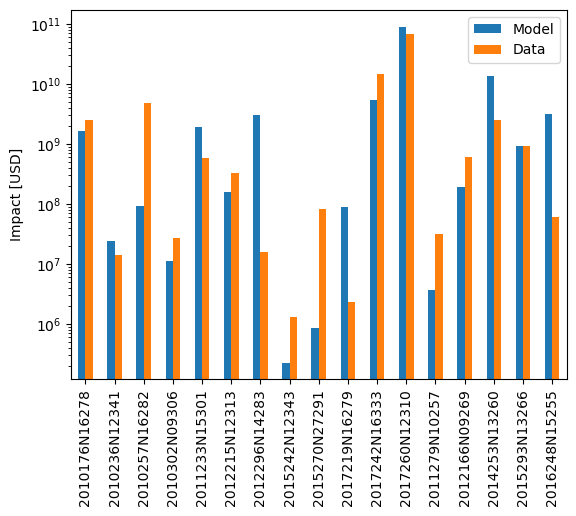
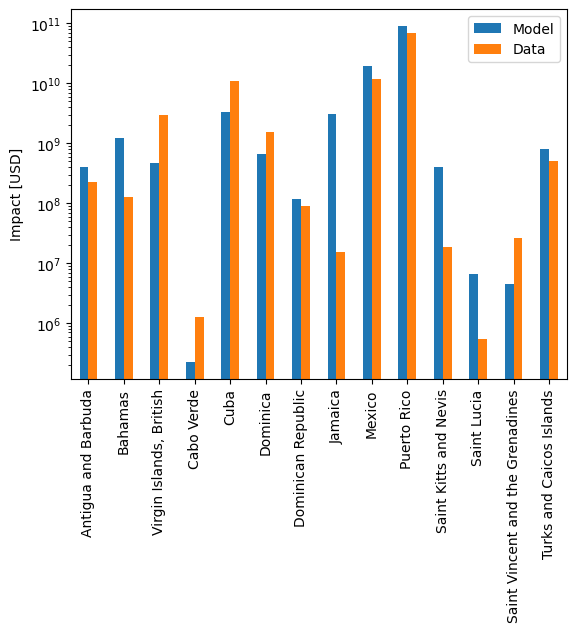
We can now compare the modelled and reported impact data on a country- or event-basis.
The OutputEvaluator also has methods for that.
In both of these, you can supply a transformation function with the data_transf argument.
This transforms the data to be plotted right before plotting.
Recall that we set the event IDs as index for the data frames.
To better interpret the results, it is useful to transform them into event names again, which are the IBTrACS IDs.
Likewise, we use the region IDs for region identification.
It might be nicer to transform these into country names before plotting.
import climada.util.coordinates as u_coord


def country_code_to_name(code):
    return u_coord.country_to_iso(code, representation="name")


event_id_to_name = {
    hazard.event_id[idx]: hazard.event_name[idx] for idx in range(len(hazard.event_id))
}
output_eval.plot_at_event(
    data_transf=lambda x: x.rename(index=event_id_to_name), logy=True
)
output_eval.plot_at_region(
    data_transf=lambda x: x.rename(index=country_code_to_name), logy=True
)
<Axes: ylabel='Impact [USD]'>
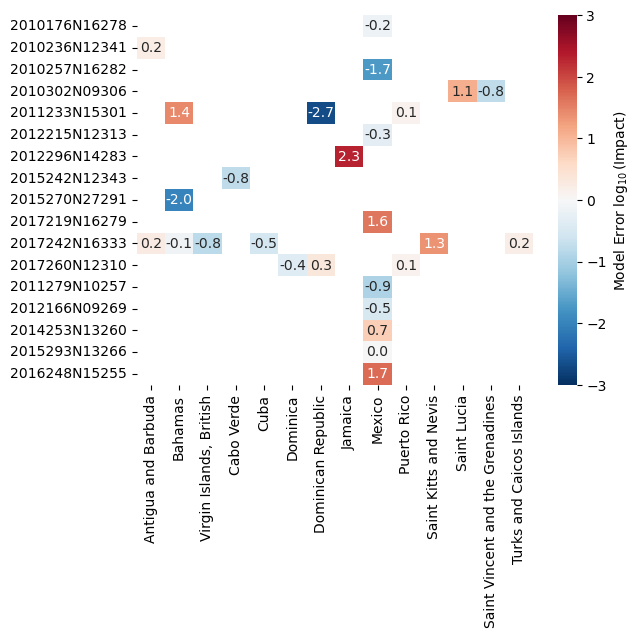
Finally, we can do an event- and country-based comparison using a heatmap using plot_event_region_heatmap()
Since the magnitude of the impact values may differ strongly, this method compare them on a logarithmic scale.
It divides each modelled impact by the observed impact and takes the the decadic logarithm.
The result will tell us how many orders of magnitude our model was off.
Again, the considerations for “nicer” index and columns apply.
output_eval.plot_event_region_heatmap(
    data_transf=lambda x: x.rename(index=event_id_to_name, columns=country_code_to_name)
)
<Axes: >
Handling Missing Data#
NaN-valued input data has a special meaning in calibration: It implies that the impact calculated by the model for that data point should be ignored. Opposed to that, a value of zero indicates that the model should be calibrated towards an impact of exactly zero for this data point.
There might be instances where data is provided for a certain region or event, and the model produces no impact for them.
This is always treated as an impact of zero during the calibration.
Likewise, there might be instances where the model computes an impact for a region for which no impact data is available.
In these cases, missing_data_value of Input is used as fill value for the data.
According to the data value logic mentioned above, missing_data_value=np.nan (the default setting) will cause the modeled impact to be ignored in the calibration.
Setting missing_data_value=0, on the other hand, will calibrate the model towards zero impact for all regions or events where no data is supplied.
Let’s exemplify this with a subset of the data used for the last calibration.
Irma is the cyclone with ID 2017242N16333, and it hit most locations we were looking at before.
It has the event ID 1454 in our setup.
Let’s just use this hazard and the related data for now.
NOTE: We must pass a dataframe to the input, but selecting a single row or column will return a Series. We expand it into a dataframe again and make sure the new frame is oriented the correct way.
hazard_irma = all_tcs.select(event_names=["2017242N16333"])
data_irma = data.loc[1454, :].to_frame().T
data_irma
| region_id | 28 | 44 | 92 | 132 | 192 | 212 | 214 | 388 | 484 | 630 | 659 | 662 | 670 | 796 |
|---|---|---|---|---|---|---|---|---|---|---|---|---|---|---|
| 1454 | 211176356.8 | 1801876.321 | 3.000000e+09 | NaN | 1.099275e+10 | NaN | NaN | NaN | NaN | NaN | 18484889.46 | NaN | NaN | 500000000.0 |
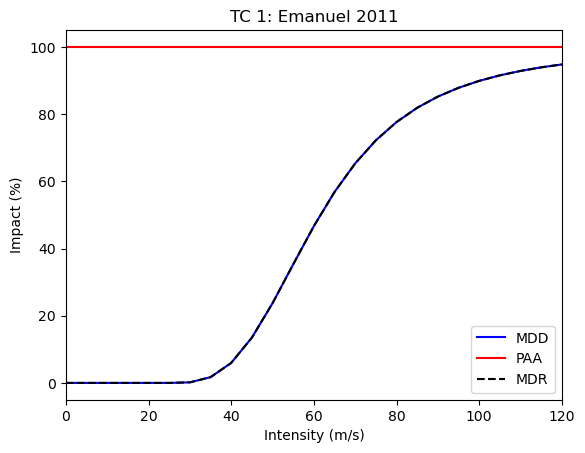
Let’s first calibrate the impact function only on this event, including all data we have.
from climada.util.calibrate import (
    Input,
    BayesianOptimizer,
    OutputEvaluator,
    msle,
)
import matplotlib.pyplot as plt


def calibrate(hazard, data, **input_kwargs):
    """Calibrate using custom hazard and data"""
    # Define calibration input
    input = Input(
        hazard=hazard,
        exposure=exposure,
        data=data,
        impact_func_creator=impact_func_tc,
        cost_func=msle,
        impact_to_dataframe=lambda imp: imp.impact_at_reg(exposure.gdf["region_id"]),
        bounds=bounds,
        **input_kwargs,
    )

    # Create and run the optimizer
    with log_level("INFO", name_prefix="climada.util.calibrate"):
        opt = BayesianOptimizer(input)
        controller = BayesianOptimizerController.from_input(input)
        bayes_output = opt.run(controller=controller)

    # Evaluate output
    output_eval = OutputEvaluator(input, bayes_output)
    output_eval.impf_set.plot()

    plt.figure()  # New figure because seaborn.heatmap draws into active axes
    output_eval.plot_event_region_heatmap(
        data_transf=lambda x: x.rename(
            index=event_id_to_name, columns=country_code_to_name
        )
    )

    return bayes_output.params  # The optimal parameters
param_irma = calibrate(hazard_irma, data_irma)
2025-04-25 14:27:18,449 - climada.util.calibrate.bayesian_optimizer - INFO - Optimization iteration: 0
2025-04-25 14:27:20,708 - climada.util.calibrate.bayesian_optimizer - INFO - Optimization iteration: 1
2025-04-25 14:27:23,082 - climada.util.calibrate.bayesian_optimizer - INFO - Optimization iteration: 2
2025-04-25 14:27:25,550 - climada.util.calibrate.bayesian_optimizer - INFO - No improvement. Stop optimization.
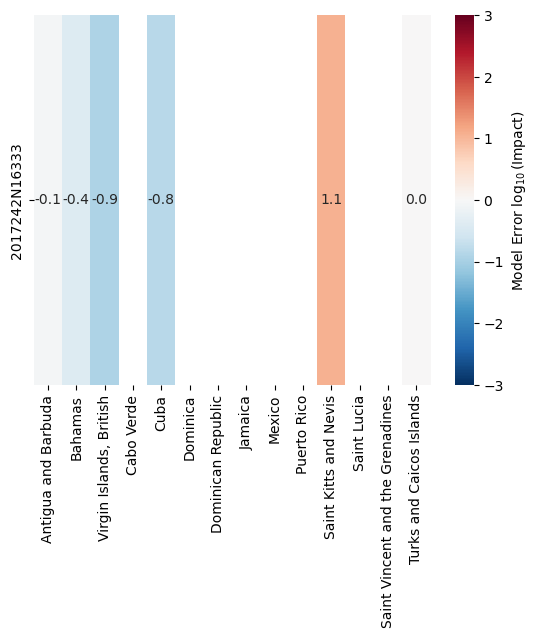
If we now remove some of the damage reports and repeat the calibration, the respective impact computed by the model will be ignored.
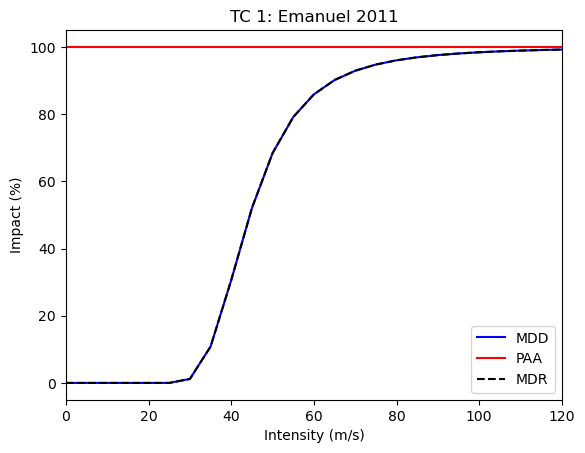
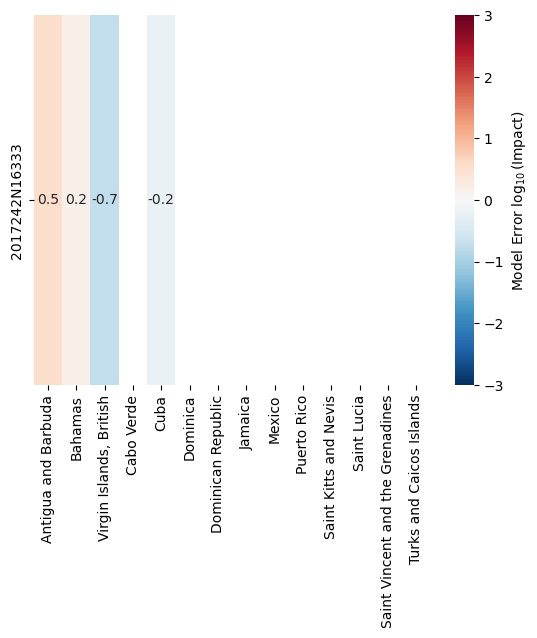
For Saint Kitts and Nevis, and for Turks and the Caicos Islands, the impact is overestimated by the model.
Removing these regions from the estimation should shift the estimated parameters accordingly, because by default, impacts for missing data points are ignored with missing_data_value=np.nan.
calibrate(hazard_irma, data_irma.drop(columns=[659, 796]))
2025-04-25 14:27:38,008 - climada.util.calibrate.bayesian_optimizer - INFO - Optimization iteration: 0
2025-04-25 14:27:40,210 - climada.util.calibrate.bayesian_optimizer - INFO - Optimization iteration: 1
2025-04-25 14:27:42,394 - climada.util.calibrate.bayesian_optimizer - INFO - Optimization iteration: 2
2025-04-25 14:27:44,707 - climada.util.calibrate.bayesian_optimizer - INFO - No improvement. Stop optimization.
{'scale': 1.0, 'v_half': 44.48812601602297}
However, the calibration should change into the other direction once we require the modeled impact at missing data points to be zero:
calibrate(hazard_irma, data_irma.drop(columns=[659, 796]), missing_data_value=0)
2025-04-25 14:27:58,736 - climada.util.calibrate.bayesian_optimizer - INFO - Optimization iteration: 0
2025-04-25 14:28:01,264 - climada.util.calibrate.bayesian_optimizer - INFO - Optimization iteration: 1
2025-04-25 14:28:04,332 - climada.util.calibrate.bayesian_optimizer - INFO - Optimization iteration: 2
2025-04-25 14:28:07,387 - climada.util.calibrate.bayesian_optimizer - INFO - No improvement. Stop optimization.
{'scale': 0.029173288291594105, 'v_half': 110.11137319113446}
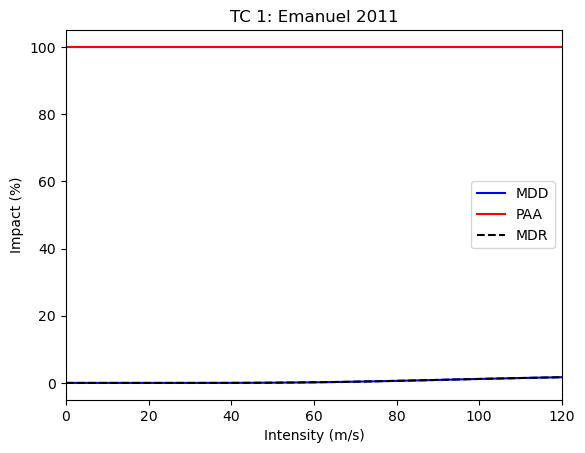
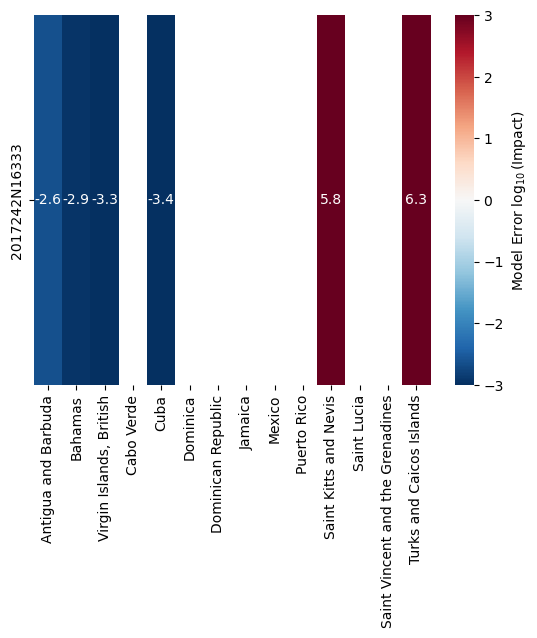
Actively requiring that the model calibrates towards zero impact in the two dropped regions means that it will typically strongly overestimate the impact there (because impact actually took place). This will “flatten” the vulnerability curve, causing strong underestimation in the other regions.
How to Continue#
While the found impact function looks reasonable, we find that the model overestimates the impact severely for several events. This might be due to missing data, but it is also strongly related to the choice of impact function (shape) and the particular goal of the calibration task.
The most crucial information in the calibration task is the cost function. The RMSE measure is sensitive to the largest errors (and hence the largest impact). Therefore, using it in the calibration minimizes the overall error, but will incorrectly capture events with impact of lower orders of magnitude. Using a cost function based on the ratio between modelled and observed impact might increase the overall error but decrease the log-error for many events.
So we present some ideas on how to continue and/or improve the calibration:
Run the calibration again, but change the number of initial steps and/or iteration steps.
Use a different cost function, e.g., an error measure based on a ratio rather than a difference.
Also calibrate the
v_threshparameter. This requires adding constraints, becausev_thresh<v_half.Calibrate different impact functions for houses in Mexico and Puerto Rico within the same optimization task.
Employ the
ScipyMinimizeOptimizerinstead of theBayesianOptimizer.
Ensemble Calibration#
The parameter space of a single calibration task gives an estimate of the uncertainty within that calibration. However, it only gives limited information on the uncertainty stemming from the model setup and impact data provided. To estimate the full model-chain uncertainty, we provide additional method for calibrating ensembles of impact functions based on subsets of the full impact data.
We define two types of ensembles and hence calibration tasks:
The average ensemble (AE) collects impact functions that are calibrated on sampled subsets of the impact data.
The ensemble of tragedies (EoT) collects impact functions that are calibrated on a single impact record each.
We provide two classes that calibrate these types of ensembles, namely AverageEnsembleOptimizer and TragedyEnsembleOptimizer.
These classes define how the impact data is sampled for each individual impact function calibration task, and then defer this task to an underlying optimizer (which we showcased before).
Both take Input object that could also be used in a single calibration optimizer.
Average Ensemble#
For each calibration of the AE, we sample the impact data by drawing a fraction of all impact values.
In this case, let’s draw the default 80% with an ensemble size of 5, meaning that we compute 5 distinct impact functions.
As underlying optimizer, we again choose the BayesianOptimizer.
The BayesianOptimizerController is passed via the optimizer_run_kwargs argument of run().
Note that you must provide the type of the underlying optimizer when constructing an EnsembleOptimizer.
from climada.util.calibrate import (
    Input,
    AverageEnsembleOptimizer,
    BayesianOptimizer,
    BayesianOptimizerController,
    msle,
)
from climada.util import log_level

# Define calibration input
with log_level("WARNING", name_prefix="climada.util.calibrate"):
    input = Input(
        hazard=hazard,
        exposure=exposure,
        data=data,
        impact_func_creator=impact_func_tc,
        cost_func=msle,
        impact_to_dataframe=lambda imp: imp.impact_at_reg(exposure.gdf["region_id"]),
        bounds=bounds,
    )

    # Create and run the optimizer
    opt_ae = AverageEnsembleOptimizer(input, optimizer_type=BayesianOptimizer)
    controller = BayesianOptimizerController.from_input(input)
    output_ae = opt_ae.run(controller=controller)
100%|██████████| 20/20 [03:01<00:00, 9.08s/it]
The output of an ensemble optimizer is different from that of a single optimizer. Instead of the parameter space for each optimization we only provide the best estimate of each iteration, along with some information on the events and regions the particular function was calibrated on. We also provide methods for plotting the resulting ensemble of impact functions.
output_ae.data
| Parameters | Event | ||||
|---|---|---|---|---|---|
| scale | v_half | event_id | region_id | event_name | |
| 0 | 0.222773 | 37.142783 | [1333, 1344, 1351, 1361, 3686, 1390, 3743, 142... | [44, 92, 132, 214, 388, 484, 630, 659, 662, 796] | [2010176N16278, 2010257N16282, 2010302N09306, ... |
| 1 | 1.000000 | 51.623892 | [1333, 1339, 1344, 1351, 1361, 3686, 1377, 374... | [28, 44, 92, 132, 192, 212, 214, 484, 630, 662] | [2010176N16278, 2010236N12341, 2010257N16282, ... |
| 2 | 1.000000 | 62.106583 | [1339, 1351, 1361, 3686, 3691, 1390, 3743, 142... | [28, 44, 92, 132, 212, 388, 484, 630, 662, 670... | [2010236N12341, 2010302N09306, 2011233N15301, ... |
| 3 | 1.000000 | 61.436076 | [1339, 1351, 1361, 3691, 1421, 1426, 3777, 379... | [28, 44, 92, 132, 192, 484, 630, 659, 662, 796] | [2010236N12341, 2010302N09306, 2011233N15301, ... |
| 4 | 0.060143 | 31.095014 | [1333, 1344, 1361, 3686, 3691, 1390, 3743, 379... | [28, 44, 212, 214, 388, 484, 630, 659, 796] | [2010176N16278, 2010257N16282, 2011233N15301, ... |
| 5 | 1.000000 | 61.224231 | [1333, 1339, 1351, 3691, 1390, 3743, 1421, 377... | [28, 132, 192, 212, 214, 388, 484, 630, 659, 6... | [2010176N16278, 2010236N12341, 2010302N09306, ... |
| 6 | 0.819839 | 47.117318 | [1333, 1339, 1351, 1361, 3686, 1377, 3743, 142... | [28, 44, 92, 132, 214, 484, 630, 659, 662, 670... | [2010176N16278, 2010236N12341, 2010302N09306, ... |
| 7 | 1.000000 | 54.945455 | [1333, 1344, 1351, 1361, 3686, 3691, 1377, 139... | [44, 92, 132, 192, 388, 484, 630, 670, 796] | [2010176N16278, 2010257N16282, 2010302N09306, ... |
| 8 | 0.825518 | 47.235135 | [1339, 1344, 1351, 1361, 3686, 1377, 1390, 374... | [28, 44, 92, 212, 214, 388, 484, 630, 662, 670] | [2010236N12341, 2010257N16282, 2010302N09306, ... |
| 9 | 1.000000 | 53.537666 | [1339, 1344, 1351, 1361, 3686, 3691, 1390, 374... | [28, 44, 92, 192, 212, 388, 484, 630, 659, 662... | [2010236N12341, 2010257N16282, 2010302N09306, ... |
| 10 | 1.000000 | 46.770608 | [1344, 1351, 1361, 3691, 1421, 3777, 3795, 145... | [28, 44, 92, 132, 192, 212, 214, 484, 630, 662] | [2010257N16282, 2010302N09306, 2011233N15301, ... |
| 11 | 0.564386 | 42.199320 | [1344, 1351, 1361, 1377, 1421, 1426, 3777, 145... | [28, 44, 132, 192, 212, 214, 484, 630, 659, 66... | [2010257N16282, 2010302N09306, 2011233N15301, ... |
| 12 | 1.000000 | 54.550104 | [1333, 1351, 1361, 3686, 3691, 1377, 1426, 379... | [28, 44, 92, 192, 214, 484, 630, 662, 796] | [2010176N16278, 2010302N09306, 2011233N15301, ... |
| 13 | 0.094194 | 30.650604 | [1333, 1361, 3686, 1377, 1390, 3743, 1421, 379... | [44, 92, 132, 192, 212, 214, 388, 484, 630, 65... | [2010176N16278, 2011233N15301, 2011279N10257, ... |
| 14 | 0.517233 | 49.958477 | [1333, 1351, 1361, 3691, 1377, 1390, 3743, 377... | [28, 44, 92, 192, 214, 388, 484, 630, 662] | [2010176N16278, 2010302N09306, 2011233N15301, ... |
| 15 | 0.289714 | 30.852674 | [1339, 1344, 1351, 1361, 3691, 1426, 3777, 379... | [28, 44, 92, 192, 212, 214, 484, 630, 659, 670... | [2010236N12341, 2010257N16282, 2010302N09306, ... |
| 16 | 0.749633 | 53.316453 | [1333, 1339, 1351, 1361, 3691, 1390, 3743, 142... | [28, 44, 132, 192, 212, 214, 388, 484, 630, 66... | [2010176N16278, 2010236N12341, 2010302N09306, ... |
| 17 | 1.000000 | 54.641313 | [1333, 1344, 1351, 1361, 3686, 3691, 1377, 374... | [28, 44, 92, 192, 214, 484, 630, 659, 662, 670... | [2010176N16278, 2010257N16282, 2010302N09306, ... |
| 18 | 0.812884 | 51.297538 | [1333, 1339, 1344, 1351, 1361, 1377, 1390, 374... | [28, 44, 92, 192, 212, 214, 388, 484, 630, 662... | [2010176N16278, 2010236N12341, 2010257N16282, ... |
| 19 | 1.000000 | 54.085105 | [1333, 1339, 1344, 1351, 1361, 3686, 3691, 137... | [28, 44, 92, 132, 192, 212, 388, 484, 630, 659... | [2010176N16278, 2010236N12341, 2010257N16282, ... |
output_ae.plot_shiny(
    impact_func_creator=impact_func_tc,
    haz_type="TC",
    impf_id=1,
    inp=input,
    legend=False,
)
<Axes: title={'center': 'TC 1'}, xlabel='Intensity [m/s]', ylabel='Impact'>
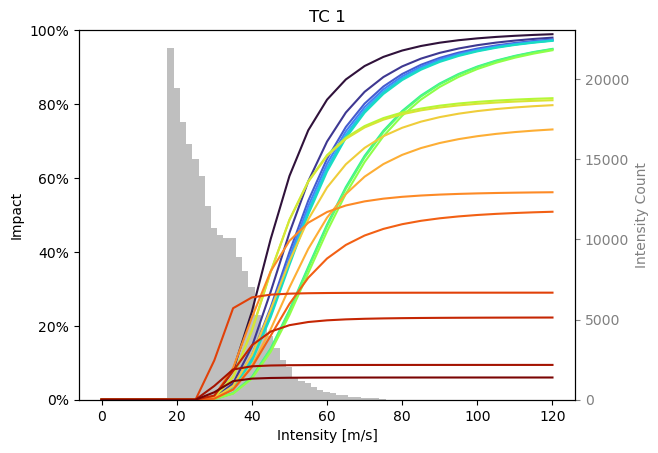
As you can see, although we only resampled the calibration data for each calibration, the functions differ quite a lot.
We can investigate exactly which impact records cause this through the ensemble of tragedies.
It can be calibrated the same way.
By default, it computes one function for every data point in data.
from climada.util.calibrate import TragedyEnsembleOptimizer

# Define calibration input
with log_level("WARNING", name_prefix="climada.util.calibrate"):
    input = Input(
        hazard=hazard,
        exposure=exposure,
        data=data,
        impact_func_creator=impact_func_tc,
        cost_func=msle,
        impact_to_dataframe=lambda imp: imp.impact_at_reg(exposure.gdf["region_id"]),
        bounds=bounds,
    )

    # Create and run the optimizer
    opt_eot = TragedyEnsembleOptimizer(input, optimizer_type=BayesianOptimizer)
    controller = BayesianOptimizerController.from_input(input)
    output_eot = opt_eot.run(controller=controller)
Data point [ 1.  25.8] is not unique. 1 duplicates registered. Continuing ...
Data point [ 1.  25.8] is not unique. 2 duplicates registered. Continuing ...
Data point [ 1.  25.8] is not unique. 3 duplicates registered. Continuing ...
Data point [ 1.  25.8] is not unique. 1 duplicates registered. Continuing ...
Data point [ 1.  25.8] is not unique. 2 duplicates registered. Continuing ...
Data point [ 1.  25.8] is not unique. 3 duplicates registered. Continuing ...
100%|██████████| 27/27 [03:25<00:00, 7.61s/it]
output_eot.data
| Parameters | Event | ||||
|---|---|---|---|---|---|
| scale | v_half | event_id | region_id | event_name | |
| 0 | 0.623918 | 43.558467 | [1333] | [484] | [2010176N16278] |
| 1 | 0.446720 | 49.853994 | [1339] | [28] | [2010236N12341] |
| 2 | 0.870346 | 30.882206 | [1344] | [484] | [2010257N16282] |
| 3 | 0.332453 | 68.510883 | [1351] | [662] | [2010302N09306] |
| 4 | 0.659666 | 38.132968 | [1351] | [670] | [2010302N09306] |
| 5 | 0.501478 | 92.838101 | [1361] | [44] | [2011233N15301] |
| 6 | 1.000000 | 25.800000 | [1361] | [214] | [2011233N15301] |
| 7 | 0.577457 | 50.142499 | [1361] | [630] | [2011233N15301] |
| 8 | 0.285608 | 31.604609 | [3686] | [484] | [2011279N10257] |
| 9 | 0.257775 | 30.957414 | [3691] | [484] | [2012166N09269] |
| 10 | 0.409814 | 40.494643 | [1377] | [484] | [2012215N12313] |
| 11 | 0.455964 | 148.659015 | [1390] | [388] | [2012296N14283] |
| 12 | 0.190400 | 50.537864 | [3743] | [484] | [2014253N13260] |
| 13 | 0.665652 | 37.430581 | [1421] | [132] | [2015242N12343] |
| 14 | 1.000000 | 25.800000 | [1426] | [44] | [2015270N27291] |
| 15 | 0.563058 | 46.037049 | [3777] | [484] | [2015293N13266] |
| 16 | 0.522021 | 112.298359 | [3795] | [484] | [2016248N15255] |
| 17 | 1.000000 | 117.135848 | [1450] | [484] | [2017219N16279] |
| 18 | 0.473914 | 50.544738 | [1454] | [28] | [2017242N16333] |
| 19 | 0.193221 | 30.347552 | [1454] | [44] | [2017242N16333] |
| 20 | 1.000000 | 32.463875 | [1454] | [92] | [2017242N16333] |
| 21 | 0.482094 | 30.424033 | [1454] | [192] | [2017242N16333] |
| 22 | 0.142128 | 69.089890 | [1454] | [659] | [2017242N16333] |
| 23 | 1.000000 | 62.107956 | [1454] | [796] | [2017242N16333] |
| 24 | 1.000000 | 26.131008 | [1458] | [212] | [2017260N12310] |
| 25 | 0.399726 | 51.035757 | [1458] | [214] | [2017260N12310] |
| 26 | 0.554834 | 37.334453 | [1458] | [630] | [2017260N12310] |
output_eot.plot_shiny(
    impact_func_creator=impact_func_tc,
    haz_type="TC",
    impf_id=1,
    inp=input,
    legend=True,
)
<Axes: title={'center': 'TC 1'}, xlabel='Intensity [m/s]', ylabel='Impact'>
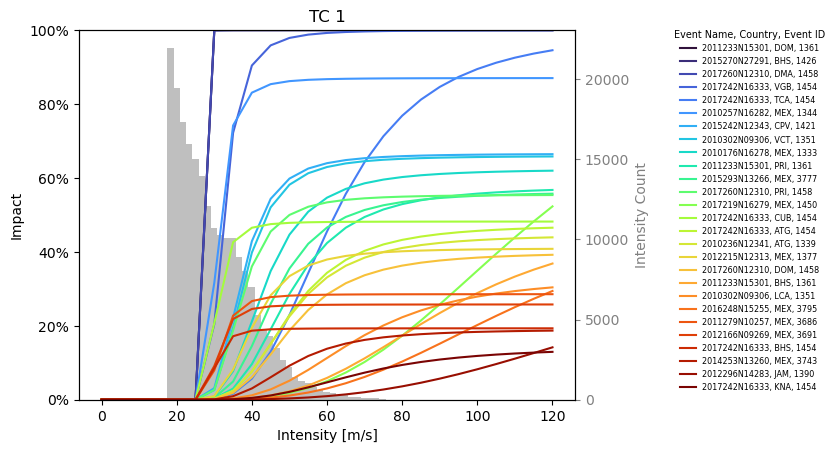
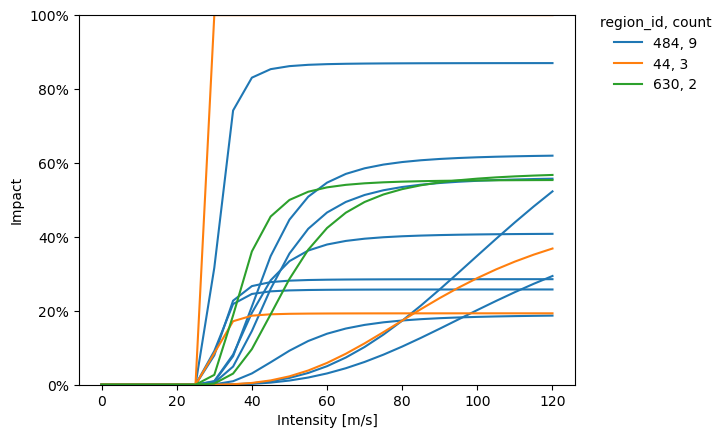
The plot_category function helps to differentiate between impact functions by plotting functions of one category with the same color.
Any data in the Event column of the data attribute in the output data may be used.
from climada.util.coordinates import country_to_iso


def to_iso(country):
    return country_to_iso(country, "numeric")


output_eot.plot_category(
    impact_func_creator=impact_func_tc,
    haz_type="TC",
    impf_id=1,
    category="region_id",
    category_colors={to_iso("MEX"): "C0", to_iso("BHS"): "C1", to_iso("PRI"): "C2"},
)
<Axes: xlabel='Intensity [m/s]', ylabel='Impact'>