
Data API#
This tutorial is separated into three main parts: the first two parts shows how to find and get data to do impact calculations and should be enough for most users. The third part provides more detailed information on how the API is built.
Finding datasets#
from climada.util.api_client import Client

client = Client()
Data types and data type groups#
The datasets are first separated into ‘data_type_groups’, which represent the main classes of CLIMADA (exposures, hazard, vulnerability, …). So far, data is available for exposures and hazard. Then, data is separated into data_types, representing the different hazards and exposures available in CLIMADA
import pandas as pd

data_types = client.list_data_type_infos()

dtf = pd.DataFrame(data_types)
dtf.sort_values(["data_type_group", "data_type"])
| data_type | data_type_group | status | description | properties | key_reference | version_notes | |
|---|---|---|---|---|---|---|---|
| 6 | centroids | centroids | active | None | [{'property': 'res_arcsec_land', 'mandatory': ... | [] | [] |
| 4 | crop_production | exposures | active | Historical and twenty-first century crop produ... | [{'property': 'crop', 'mandatory': True, 'desc... | [{'ref_no': 1, 'ref_url': 'https://doi.org/10.... | [] |
| 10 | crops | exposures | active | Crop exposure for Switzerland in 2021 obtained... | [{'property': 'crop', 'mandatory': True, 'desc... | [{'ref_no': 1, 'ref_url': 'https://doi.org/10.... | [] |
| 0 | litpop | exposures | active | A global high-resolution asset exposure datase... | [{'property': 'spatial_coverage', 'mandatory':... | [{'ref_no': 1, 'ref_url': 'https://doi.org/10.... | [{'version': 'v2', 'notes': 'Countries with no... |
| 13 | aqueduct_coastal_flood | hazard | active | Global probabilistic coastal flood maps for ba... | [{'property': 'climate_scenario', 'mandatory':... | [{'ref_no': 1, 'ref_url': 'https://www.wri.org... | [] |
| 8 | earthquake | hazard | active | Earthquake hazard sets at 150 arcsec (ca. 4km)... | [{'property': 'res_arcsec', 'mandatory': True,... | [{'ref_no': 1, 'ref_url': None, 'key_reference... | [] |
| 9 | flood | hazard | active | Flood footprint of historical events at a 200m... | [{'property': 'date_creation', 'mandatory': Tr... | [] | [] |
| 12 | hail | hazard | active | Radar-based daily hail hazard data at 1km spat... | [{'property': 'variable', 'mandatory': True, '... | [{'ref_no': 1, 'ref_url': 'https://doi.org/10.... | [] |
| 7 | relative_cropyield | hazard | active | Historical and twenty-first century crop produ... | [{'property': 'climate_scenario', 'mandatory':... | [{'ref_no': 1, 'ref_url': 'https://doi.org/10.... | [] |
| 3 | river_flood | hazard | active | River flood [flood depth in meters and flooded... | [{'property': 'res_arcsec', 'mandatory': True,... | [{'ref_no': 1, 'ref_url': 'https://www.nature.... | [{'version': 'v2', 'notes': 'Higher resolution... |
| 5 | storm_europe | hazard | active | European winter storm [gust in meters per seco... | [{'property': 'data_source', 'mandatory': Fals... | [{'ref_no': 1, 'ref_url': 'https://www.nat-haz... | [] |
| 1 | tropical_cyclone | hazard | active | Tropical cyclone wind footprints (m/s) at 150 ... | [{'property': 'spatial_coverage', 'mandatory':... | [{'ref_no': 1, 'ref_url': 'https://doi.org/10.... | [{'version': 'v2', 'notes': 'Higher resolution... |
| 2 | wildfire | hazard | active | Global wildfire dataset at 4km resolution, bas... | [{'property': 'res_arcsec', 'mandatory': True,... | [{'ref_no': 1, 'ref_url': 'https://gmd.coperni... | [] |
| 11 | hail_damage_crops | impact | active | Hail damage to crops for 10-12 hail days (depe... | [{'property': 'crop', 'mandatory': True, 'desc... | [{'ref_no': 1, 'ref_url': 'https://doi.org/10.... | [] |
Datasets and Properties#
For each data type, the single datasets can be differentiated based on properties. The following function provides a table listing the properties and possible values. This table does not provide information on properties that can be combined but the search can be refined in order to find properties to query a unique dataset. Note that a maximum of 10 property values are shown here, but many more countries are available for example.
litpop_dataset_infos = client.list_dataset_infos(data_type="litpop")
all_properties = client.get_property_values(litpop_dataset_infos)
all_properties.keys()
dict_keys(['res_arcsec', 'exponents', 'fin_mode', 'spatial_coverage', 'country_iso3alpha', 'country_name', 'country_iso3num'])
Refining the search:#
# as datasets are usually available per country, chosing a country or global dataset reduces the options
# here we want to see which datasets are available for litpop globally:
client.get_property_values(
    litpop_dataset_infos, known_property_values={"spatial_coverage": "global"}
)
{'res_arcsec': ['150'],
 'exponents': ['(0,1)', '(1,1)', '(3,0)'],
 'fin_mode': ['pop', 'pc'],
 'spatial_coverage': ['global']}
# and here for Switzerland:
client.get_property_values(
    litpop_dataset_infos, known_property_values={"country_name": "Switzerland"}
)
{'res_arcsec': ['150'],
 'exponents': ['(3,0)', '(0,1)', '(1,1)'],
 'fin_mode': ['pc', 'pop'],
 'spatial_coverage': ['country'],
 'country_iso3alpha': ['CHE'],
 'country_name': ['Switzerland'],
 'country_iso3num': ['756']}
Basic impact calculation#
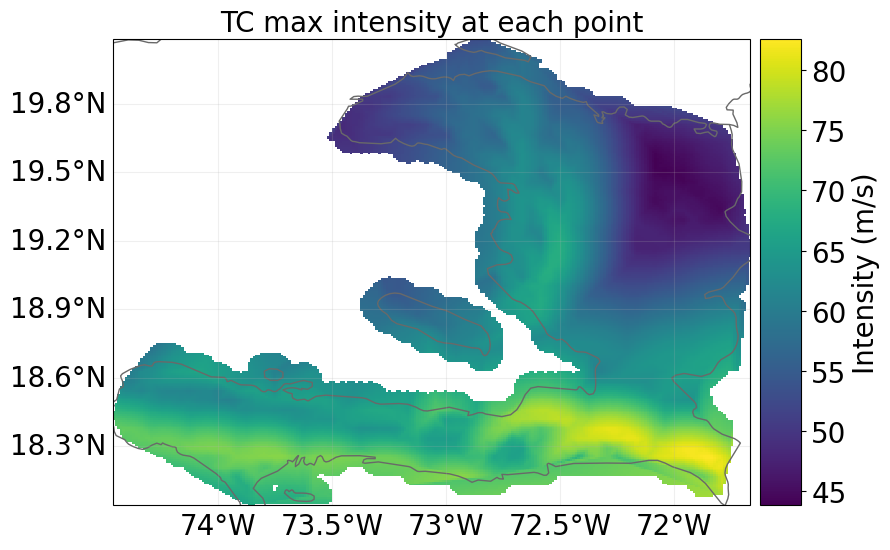
We here show how to make a basic impact calculation with tropical cyclones for Haiti, for the year 2040, rcp4.5 and generated with 10 synthetic tracks. For more technical details on the API, see below.
Wrapper functions to open datasets as CLIMADA objects#
The wrapper functions client.get_hazard()#
gets the dataset information, downloads the data and opens it as a hazard instance
tc_dataset_infos = client.list_dataset_infos(data_type="tropical_cyclone")
client.get_property_values(
    tc_dataset_infos, known_property_values={"country_name": "Haiti"}
)
{'res_arcsec': ['150'],
 'event_type': ['synthetic', 'observed'],
 'model_name': ['random_walk', 'STORM'],
 'spatial_coverage': ['country'],
 'climate_scenario': ['rcp26', 'rcp45', 'None', 'rcp60', 'rcp85'],
 'ref_year': ['2040', '2060', '2080'],
 'country_iso3alpha': ['HTI'],
 'country_name': ['Haiti'],
 'country_iso3num': ['332'],
 'gcm': ['CMCC-CM2-VHR4', 'CNRM-CM6-1-HR', 'EC-Earth3P-HR', 'HadGEM3-GC31-HM']}
client = Client()
tc_haiti = client.get_hazard(
    "tropical_cyclone",
    properties={
        "country_name": "Haiti",
        "climate_scenario": "rcp45",
        "ref_year": "2040",
        # "nb_synth_tracks": "10",
    },
)
tc_haiti.plot_intensity(0);
2025-07-11 11:19:49,740 - climada.hazard.io - INFO - Reading C:\Users\timschmi\climada\data\hazard\tropical_cyclone\tropical_cyclone_10synth_tracks_150arcsec_rcp45_HTI_2040\v2.1\tropical_cyclone_10synth_tracks_150arcsec_rcp45_HTI_2040.hdf5
The wrapper functions client.get_litpop()#
gets the default litpop, with exponents (1,1) and ‘produced capital’ as financial mode. If no country is given, the global dataset will be downloaded.
litpop_default = client.get_property_values(
    litpop_dataset_infos, known_property_values={"fin_mode": "pc", "exponents": "(1,1)"}
)
litpop = client.get_litpop(country="Haiti")
2025-07-04 14:36:24,838 - climada.entity.exposures.base - INFO - Reading C:\Users\timschmi\climada\data\exposures\litpop\LitPop_150arcsec_HTI\v3\LitPop_150arcsec_HTI.hdf5
Get the default impact function for tropical cyclones#
from climada.entity.impact_funcs import ImpactFuncSet, ImpfTropCyclone

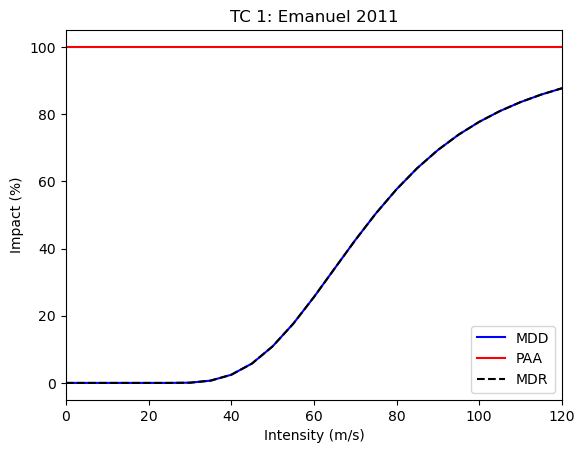
imp_fun = ImpfTropCyclone.from_emanuel_usa()
imp_fun.check()
imp_fun.plot()

imp_fun_set = ImpactFuncSet([imp_fun])

litpop.impact_funcs = imp_fun_set
Calculate the impact#
from climada.engine import ImpactCalc

impact = ImpactCalc(litpop, imp_fun_set, tc_haiti).impact()
2025-07-04 14:36:34,432 - climada.entity.exposures.base - INFO - No specific impact function column found for hazard TC. Using the anonymous 'impf_' column.
2025-07-04 14:36:34,432 - climada.entity.exposures.base - INFO - Matching 1329 exposures with 1332 centroids.
2025-07-04 14:36:34,432 - climada.util.coordinates - INFO - No exact centroid match found. Reprojecting coordinates to nearest neighbor closer than the threshold = 100
2025-07-04 14:36:34,432 - climada.engine.impact_calc - INFO - Calculating impact for 3987 assets (>0) and 43560 events.
Getting other Exposures#
crop_dataset_infos = client.list_dataset_infos(data_type="crop_production")

client.get_property_values(crop_dataset_infos)
{'crop': ['whe', 'soy', 'ric', 'mai'],
 'irrigation_status': ['noirr', 'firr'],
 'unit': ['USD', 'Tonnes'],
 'spatial_coverage': ['global']}
rice_exposure = client.get_exposures(
    exposures_type="crop_production",
    properties={"crop": "ric", "unit": "USD", "irrigation_status": "noirr"},
)
2025-07-04 14:36:49,797 - climada.entity.exposures.base - INFO - Reading C:\Users\timschmi\climada\data\exposures\crop_production\crop_production_ric-noirr_spamray-mirca_USD\v1\crop_production_ric-noirr_spamray-mirca_USD.hdf5
Getting base centroids to generate new hazard files#
centroids = client.get_centroids()
centroids.plot()
<GeoAxes: >
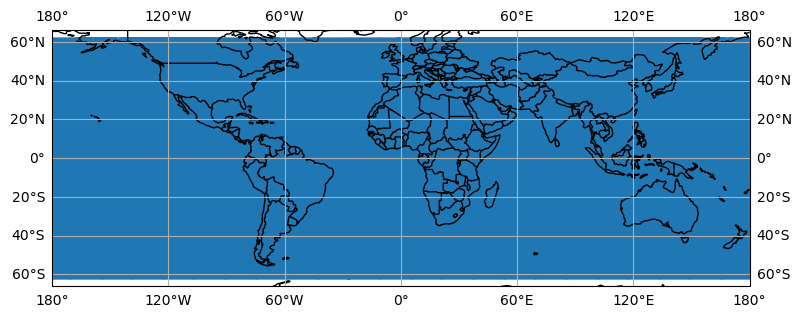
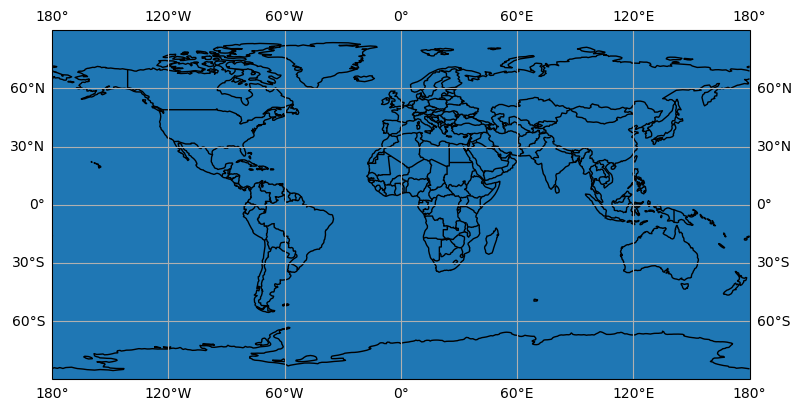
By default the latitude extent is limited to [-60,60], which is sufficient for many hazards and will reduce the computational ressources required. If a complete latitude extent [-90,90] or a smaller extent is desired, it can be specified with the extent keyword agrument.
centroids_complete = client.get_centroids(extent=[-180, 180, -90, 90])
centroids_complete.plot()
<GeoAxes: >
centroids are also available per country:
centroids_hti = client.get_centroids(country="HTI")
Technical Information#
For programmatical access to the CLIMADA data API there is a specific REST call wrapper class: climada.util.client.Client.
Server#
The CLIMADA data file server is hosted on https://data.iac.ethz.ch that can be accessed via a REST API at https://climada.ethz.ch. For REST API details, see the documentation.
Client#
?Client
Init signature: Client(cache_enabled=None)
Docstring:      Python wrapper around REST calls to the CLIMADA data API server.
Init docstring:
Constructor of Client.

Data API host and chunk_size (for download) are configurable values.
Default values are 'climada.ethz.ch' and 8096 respectively.

Parameters
----------
cache_enabled : bool, optional
    This flag controls whether the api calls of this client are going to be cached to the
    local file system (location defined by CONFIG.data_api.cache_dir).
    If set to true, the client can reload the results from the cache in case there is no
    internet connection and thus work in offline mode.
    Default: None, in this case the value is taken from CONFIG.data_api.cache_enabled.
File:           c:\users\timschmi\documents\phd\code\climada_python\climada\util\api_client.py
Type:           type
Subclasses:
client = Client()
client.chunk_size
8192
The url to the API server and the chunk size for the file download can be configured in ‘climada.conf’. Just replace the corresponding default values:
    "data_api": {
        "host": "https://climada.ethz.ch",
        "chunk_size": 8192,
        "cache_db": "{local_data.system}/.downloads.db"
    }
The other configuration value affecting the data_api client, cache_db, is the path to an SQLite database file, which is keeping track of the files that are successfully downloaded from the api server. Before the Client attempts to download any file from the server, it checks whether the file has been downloaded before and if so, whether the previously downloaded file still looks good (i.e., size and time stamp are as expected). If all of this is the case, the file is simply read from disk without submitting another request.
Metadata#
Unique Identifiers#
Any dataset can be identified with data_type, name and version. The combination of the three is unique in the API servers’ underlying database. However, sometimes the name is already enough for identification. All datasets have a UUID, a universally unique identifier, which is part of their individual url. E.g., the uuid of the dataset https://climada.ethz.ch/rest/dataset/b1c76120-4e60-4d8f-99c0-7e1e7b7860ec is “b1c76120-4e60-4d8f-99c0-7e1e7b7860ec”. One can retrieve their meta data by:
client.get_dataset_info_by_uuid("b1c76120-4e60-4d8f-99c0-7e1e7b7860ec")
DatasetInfo(uuid='b1c76120-4e60-4d8f-99c0-7e1e7b7860ec', data_type=DataTypeShortInfo(data_type='litpop', data_type_group='exposures'), name='LitPop_assets_pc_150arcsec_SGS', version='v1', status='expired', properties={'res_arcsec': '150', 'exponents': '(3,0)', 'fin_mode': 'pc', 'spatial_coverage': 'country', 'date_creation': '2021-09-23', 'climada_version': 'v2.2.0', 'country_iso3alpha': 'SGS', 'country_name': 'South Georgia and the South Sandwich Islands', 'country_iso3num': '239'}, files=[FileInfo(uuid='b1c76120-4e60-4d8f-99c0-7e1e7b7860ec', url='https://data.iac.ethz.ch/climada/b1c76120-4e60-4d8f-99c0-7e1e7b7860ec/LitPop_assets_pc_150arcsec_SGS.hdf5', file_name='LitPop_assets_pc_150arcsec_SGS.hdf5', file_format='hdf5', file_size=1086488, check_sum='md5:27bc1846362227350495e3d946dfad5e')], doi=None, description="LitPop asset value exposure per country: Gridded physical asset values by country, at a resolution of 150 arcsec. Values are total produced capital values disaggregated proportionally to the cube of nightlight intensity (Lit^3, based on NASA Earth at Night). The following values were used as parameters in the LitPop.from_countries() method:{'total_values': 'None', 'admin1_calc': 'False','reference_year': '2018', 'gpw_version': '4.11'}Reference: Eberenz et al., 2020. https://doi.org/10.5194/essd-12-817-2020", license='Attribution 4.0 International (CC-BY-4.0)', activation_date='2021-09-13 09:08:28.358559+00:00', expiration_date='2022-06-27 14:35:55.203081+00:00')
or by filtering:
Data Set Status#
The datasets of climada.ethz.ch may have the following stati:
active: the default for real life data
preliminary: when the dataset is already uploaded but some information or file is still missing
expired: when a dataset is inactivated again
test_dataset: data sets that are used in unit or integration tests have this status in order to be taken seriously by accident When collecting a list of datasets with
get_datasets, the default dataset status will be ‘active’. With the argumentstatus=Nonethis filter can be turned off.
DatasetInfo Objects and DataFrames#
As stated above get_dataset (or get_dataset_by_uuid) return a DatasetInfo object and get_datasets a list thereof.
from climada.util.api_client import DatasetInfo

?DatasetInfo
Init signature:
DatasetInfo(
    uuid: str,
    data_type: climada.util.api_client.DataTypeShortInfo,
    name: str,
    version: str,
    status: str,
    properties: dict,
    files: list,
    doi: str,
    description: str,
    license: str,
    activation_date: str,
    expiration_date: str,
) -> None
Docstring:      dataset data from CLIMADA data API.
File:           c:\users\timschmi\documents\phd\code\climada_python\climada\util\api_client.py
Type:           type
Subclasses:
where files is a list of FileInfo objects:
from climada.util.api_client import FileInfo

?FileInfo
Init signature:
FileInfo(
    uuid: str,
    url: str,
    file_name: str,
    file_format: str,
    file_size: int,
    check_sum: str,
) -> None
Docstring:      file data from CLIMADA data API.
File:           c:\users\timschmi\documents\phd\code\climada_python\climada\util\api_client.py
Type:           type
Subclasses:
Convert into DataFrame#
There is a conveinience function to easily convert dataset lists into pandas DataFrames, into_datasets_df:
?client.into_datasets_df
Signature: client.into_datasets_df(dataset_infos)
Docstring:
Convenience function providing a DataFrame of datasets with properties.

Parameters
----------
dataset_infos : list of DatasetInfo
     as returned by list_dataset_infos

Returns
-------
pandas.DataFrame
    of datasets with properties as found in query by arguments
File:      c:\users\timschmi\documents\phd\code\climada_python\climada\util\api_client.py
Type:      function
from climada.util.api_client import Client

client = Client()
litpop_datasets = client.list_dataset_infos(
    data_type="litpop",
    properties={"country_name": "Germany"},
)
litpop_df = client.into_datasets_df(litpop_datasets)
litpop_df
| data_type | data_type_group | uuid | name | version | status | doi | description | license | activation_date | expiration_date | res_arcsec | exponents | fin_mode | spatial_coverage | climada_version | date_creation | country_iso3alpha | country_name | country_iso3num | |
|---|---|---|---|---|---|---|---|---|---|---|---|---|---|---|---|---|---|---|---|---|
| 0 | litpop | exposures | 5a3e72fb-a8e0-48b5-b2ec-d6d9b845b687 | LitPop_assets_pc_150arcsec_DEU | v3 | active | None | LitPop asset value exposure per country: Gridd... | Attribution 4.0 International (CC-BY-4.0) | 2024-06-07 08:21:45.775654+00:00 | None | 150 | (3,0) | pc | country | v4.1.1 (v3.1.2) | 2022-6-30 | DEU | Germany | 276 |
| 1 | litpop | exposures | 552ce473-953f-44db-9504-0bf078ba7cb7 | LitPop_pop_150arcsec_DEU | v3 | active | None | LitPop population exposure per country: Gridde... | Attribution 4.0 International (CC-BY-4.0) | 2024-06-07 08:21:51.998009+00:00 | None | 150 | (0,1) | pop | country | v4.1.1 (v3.1.2) | 2022-6-30 | DEU | Germany | 276 |
| 2 | litpop | exposures | ca0b1390-0ccc-4bac-8867-c6f9c0ef7703 | LitPop_150arcsec_DEU | v3 | active | None | LitPop asset value exposure per country: Gridd... | Attribution 4.0 International (CC-BY-4.0) | 2024-06-07 08:21:55.563907+00:00 | None | 150 | (1,1) | pc | country | v4.1.1 (v3.1.2) | 2022-6-26 | DEU | Germany | 276 |
Download#
The wrapper functions get_exposures or get_hazard fetch the information, download the file and opens the file as a climada object. But one can also just download dataset files using the method download_dataset which takes a DatasetInfo object as argument and downloads all files of the dataset to a directory in the local file system.
?client.download_dataset
Signature:
client.download_dataset(
    dataset,
    target_dir=WindowsPath('C:/Users/timschmi/climada/data'),
    organize_path=True,
)
Docstring:
Download all files from a given dataset to a given directory.

Parameters
----------
dataset : DatasetInfo
    the dataset
target_dir : Path, optional
    target directory for download, by default `climada.util.constants.SYSTEM_DIR`
organize_path: bool, optional
    if set to True the files will end up in subdirectories of target_dir:
    [target_dir]/[data_type_group]/[data_type]/[name]/[version]
    by default True

Returns
-------
download_dir : Path
    the path to the directory containing the downloaded files,
    will be created if organize_path is True
downloaded_files : list of Path
    the downloaded files themselves

Raises
------
Exception
    when one of the files cannot be downloaded
File:      c:\users\timschmi\documents\phd\code\climada_python\climada\util\api_client.py
Type:      method
Cache#
The method avoids superfluous downloads by keeping track of all downloads in a sqlite db file. The client will make sure that the same file is never downloaded to the same target twice.
Examples#
# Let's have a look at an example for downloading a litpop dataset first
ds = litpop_datasets[
    0
]  # litpop_datasets is a list and download_dataset expects a single object as argument.
download_dir, ds_files = client.download_dataset(ds)
ds_files[0], ds_files[0].is_file()
(WindowsPath('C:/Users/timschmi/climada/data/exposures/litpop/LitPop_assets_pc_150arcsec_DEU/v3/LitPop_assets_pc_150arcsec_DEU.hdf5'),
 True)
# Another example for downloading a hazard (tropical cyclone) dataset
ds_tc = tc_dataset_infos[0]
download_dir, ds_files = client.download_dataset(ds_tc)
ds_files[0], ds_files[0].is_file()
(WindowsPath('C:/Users/timschmi/climada/data/hazard/tropical_cyclone/tropical_cyclone_10synth_tracks_150arcsec_rcp26_global_2040/v2.1/tropical_cyclone_10synth_tracks_150arcsec_rcp26_global_2040.hdf5'),
 True)
If the dataset contains only one file (which is most commonly the case) this file can also be downloaded and accessed in a single step, using the get_dataset_file method:
from climada.util.api_client import Client

Client().get_dataset_file(
    data_type="litpop",
    properties={
        "country_name": "South Georgia and the South Sandwich Islands",
        "fin_mode": "pop",
    },
)
WindowsPath('C:/Users/timschmi/climada/data/exposures/litpop/LitPop_pop_150arcsec_SGS/v3/LitPop_pop_150arcsec_SGS.hdf5')
Local File Cache#
By default, the API Client downloads files into the ~/climada/data directory.
In the course of time obsolete files may be accumulated within this directory, because there is a newer version of these files available from the CLIMADA data API, or because the according dataset got expired altogether.
To prevent file rot and free disk space, it’s possible to remove all outdated files at once, by simply calling Client().purge_cache(). This will remove all files that were ever downloaded with the api_client.Client and for which a newer version exists, even when the newer version has not been downloaded yet.
Offline Mode#
The API Client is silently used in many methods and functions of CLIMADA, including the installation test that is run to see whether the CLIMADA installation was successful. Most methods of the client send GET requests to the API server assuming the latter is accessible through a working internet connection. If this is not the case, the functionality of CLIMADA is severely limited if not altogether lost. Often this is an unnecessary restriction, e.g., when a user wants to access a file through the API Client that is already downloaded and available in the local filesystem.
In such cases the API Client runs in offline mode. In this mode the client falls back to previous results for the same call in case there is no internet connection or the server is not accessible.
To turn this feature off and make sure that all results are current and up to date - at the cost of failing when there is no internet connection - one has to disable tha cache.
This can be done programmatically, by initializing the API Client with the optional argument cache_enabled:
client = Client(cache_enabled=False)
Or it can be done through configuration. Edit the climada.conf file in the working directory or in ~/climada/ and change the “cache_enabled” value, like this:
...
    "data_api": {
        ...
        "cache_enabled": false
    },
...
While cache_enabled is true (default), every result from the server is stored as a json file in ~/climada/data/.apicache/ by a unique name derived from the method and arguments of the call.
If the very same call is made again later, at a time where the server is not accessible, the client just comes back to the cached result from the previous call.