Development with Git#
Here we provide a detailed instruction to the use of Git and GitHub and their workflows, which are essential to the code development of CLIMADA.
Git and GitHub#
Git’s not that scary
95% of your work on Git will be done with the same handful of commands (the other 5% will always be done with careful Googling)
Almost everything in Git can be undone by design (but use
rebase,--forceand--hardwith care!)Your favourite IDE (Spyder, PyCharm, …) will have a GUI for working with Git, or you can download a standalone one.
The Git Book is a great introduction to how Git works and to using it on the command line.
Consider using a GUI program such as “git desktop” or “Gitkraken” to have a visual git interface, in particular at the beginning. Your python IDE is also likely to have a visual git interface.
Feel free to ask for help
What we assume you know#
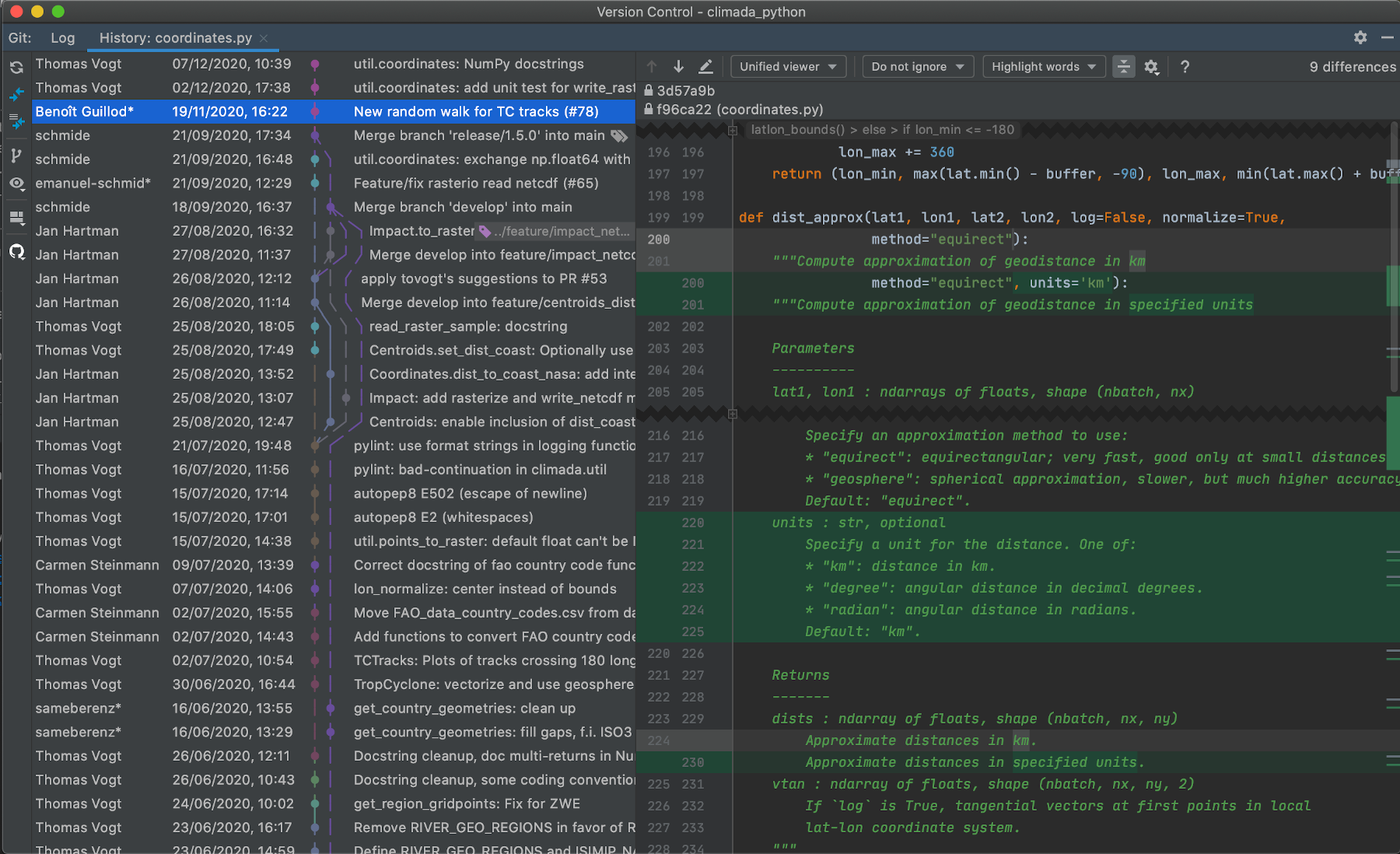
We’re assuming you’re all familiar with the basics of Git.
What (and why) is version control
How to clone a repository
How to make a commit and push it to GitHub
What a branch is, and how to make one
How to merge two branches
The basics of the GitHub website
If you’re not feeling great about this, we recommend
sending me a message so we can arrange an introduction with CLIMADA
exploring the Git Book
Terms we’ll be using today#
These are terms that will come up a lot, so let’s make sure we know them
local versus remote
Our remote repository is hosted on GitHub. This is the central location where all updates to CLIMADA that we want to share end up. If you’re updating CLIMADA for the community, your code will end up here too.
Your local repository is the copy you have on the machine you’re working on, and where you do your work.
Git calls the (first, default) remote the
origin(It’s possible to set more than one remote repository, e.g. you might set one up on a network-restricted computing cluster)
push, pull and pull request
You push your work when you send it from your local machine to the remote repository
You pull from the remote repository to update the code on your local machine
A pull request is a standardised review process on GitHub. Usually it ends with one branch merging into another
Conflict resolution
Sometimes two people have made changes to the same bit of code. Usually this comes up when you’re trying to merge branches. The changes have to be manually compared and the code edited to make sure the ‘correct’ version of the code is kept.
Gitflow#
Gitflow is a particular way of using git to organise projects that have
multiple developers
working on different features
with a release cycle
It means that
there’s always a stable version of the code available to the public
the chances of two developers’ code conflicting are reduced
the process of adding and reviewing features and fixes is more standardised for everyone
Gitflow is a convention, so you don’t need any additional software.
… but if you want you can get some: a popular extension to the git command line tool allows you to issue more intuitive commands for a Gitflow workflow.
Mac/Linux users can install git-flow from their package manager, and it’s included with Git for Windows
Gitflow works on the develop branch instead of main#
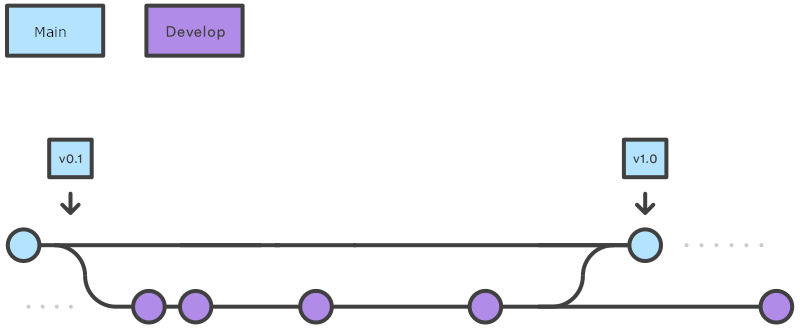
The critical difference between Gitflow and ‘standard’ git is that almost all of your work takes place on the
developbranch, instead of themain(formerlymaster) branch.The
mainbranch is reserved for planned, stable product releases, and it’s what the general public download when they install CLIMADA. The developers almost never interact with it.
Gitflow is a feature-based workflow#
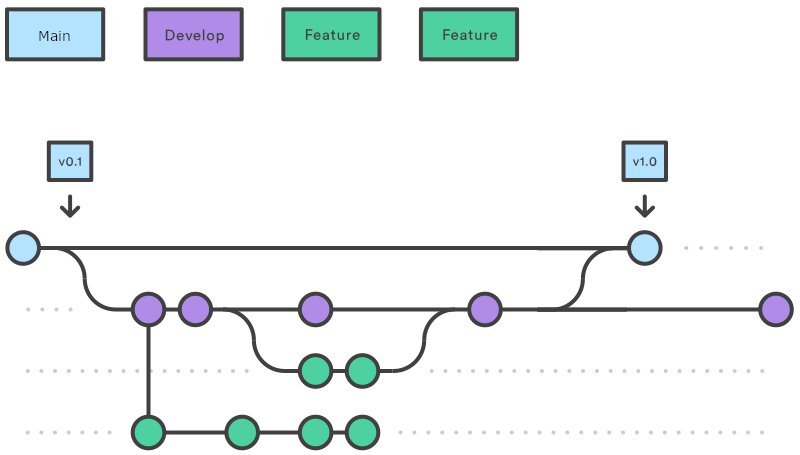
This is common to many workflows: when you want to add something new to the model you start a new branch, work on it locally, and then merge it back into
developwith a pull request (which we’ll cover later).
By convention we name all CLIMADA feature branches
feature/*(e.g.feature/meteorite).Features can be anything, from entire hazard modules to a smarter way to do one line of a calculation. Most of the work you’ll do on CLIMADA will be a features of one size or another.
We’ll talk more about developing CLIMADA features later!
Gitflow enables a regular release cycle#
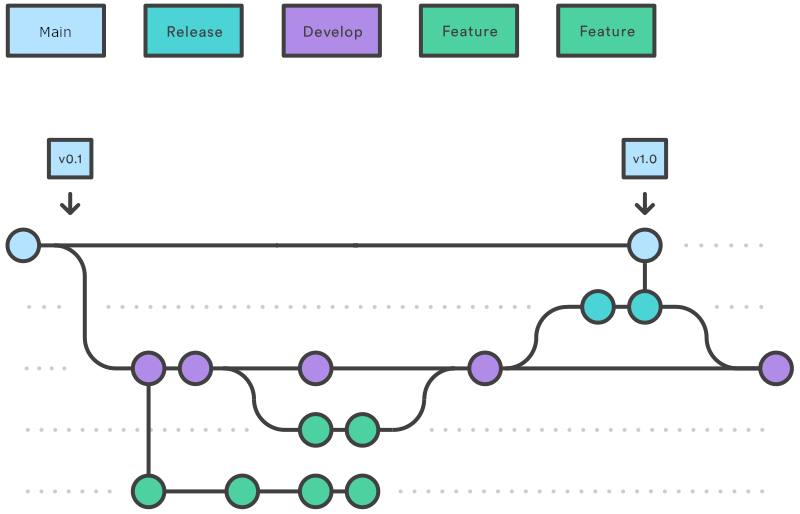
A release is usually more complex than merging
developintomain.
So for this a
release-*branch is created fromdevelop. We’ll all be notified repeatedly when the deadline is to submit (and then to review) pull requests so that you can be included in a release.The core developer team (mostly Emanuel) will then make sure tests, bugfixes, documentation and compatibility requirements are met, merging any fixes back into
develop.On release day, the release branch is merged into
main, the commit is tagged as a release and the release notes are published on the GitHub at CLIMADA-project/climada_python
Everything else is hotfixes#
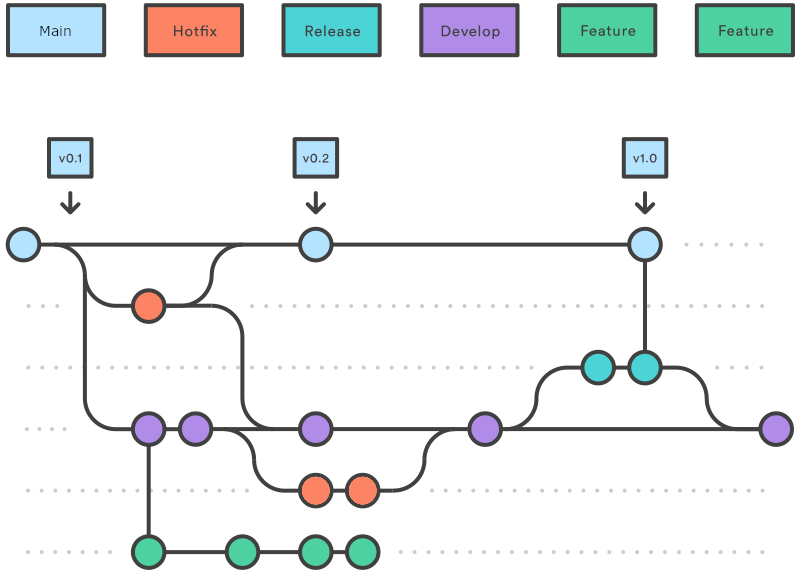
The other type of branch you’ll create is a hotfix.
Hotfixes are generally small changes to code that do one thing, fixing typos, small bugs, or updating docstrings. They’re done in much the same way as features, and are usually merged with a pull request.
The difference between features and hotfixes is fuzzy and you don’t need to worry about getting it right.
Hotfixes will occasionally be used to fix bugs on the
mainbranch, in which case they will merge into bothmainanddevelop.Some hotfixes are so simple - e.g. fixing a typo or a docstring - that they don’t need a pull request. Use your judgement, but as a rule, if you change what the code does, or how, you should be merging with a pull request.